

There was a time I needed a workspace in Ibadan that would stay open while the rest of the city was going to sleep.
I was working with clients in the US and the UK, and their working hours often meant I had to keep going late into the night.
The problem was that the coworking spaces I found were closing around 5 or 6 PM.
I didn’t need a beautiful office that locked its doors in the evening. I needed somewhere I could work whenever the job demanded it.
So I searched Google for “24/7 workspace near me.”
That’s how I found Seb’s Hub.
I called the number listed on Google, and Mr Francis, the CEO, answered immediately.
I asked about the facilities, got the information I needed, and paid ₦40,000 for a month of 24/7 access.
What began as a search for somewhere to work at night turned into a long-term arrangement.
Think about what had to happen for that decision to be made.
I had a problem. Google helped me discover a business that could solve it.
The listing gave me a way to make contact, and that conversation gave me enough confidence to pay.
Now imagine if Seb’s Hub hadn’t appeared in my search.
Or if the phone number had been wrong, the opening hours unclear, or the location difficult to find.
I might have moved on to another option without the business ever knowing I was looking.
The same thing happens every day, in every city.
Someone has an event tomorrow and needs a hair salon they can trust. They compare photos, reviews and opening hours, then pick the one that looks ready for them.
Someone else needs a pharmacy that is open right now. They check the map, the hours and the phone number before they leave home.
If the salon or the pharmacy is missing from Google Maps, or its details are wrong, the customer simply goes elsewhere.
That is the opportunity a well-managed Google Business Profile creates.
When people search for a business or service nearby, your listing helps them discover you, understand what you offer, contact you, and decide whether to visit or buy.
And you don’t have to pay Google to create one.
In this guide, I’ll show you how to put your business on Google Maps, step by step, with real screenshots from Google’s own sign-up screens.
You will see how to create or claim your Google Business Profile, choose the right location settings, complete verification, avoid common mistakes and rank higher on the map.
I’ll also explain what to do after your profile goes live, because being listed on Google Maps and becoming the business a customer chooses are two different things.
Whether you run a salon in Manchester, a pharmacy in Lagos, a repair business in Toronto or a shop in Chicago, the goal is the same.
Make it easier for the right customers to find you, trust what they see and take the next step.
To put your business on Google Maps, create a free Google Business Profile (it used to be called Google My Business) at business.google.com/add.
Enter your business name, business type, category, address or service area and phone number, then verify that you own the business using the method Google offers you.
Once Google approves the verification, your business can appear on Google Maps and Google Search together. Google says you can add or claim your business at no charge.
Published October 2026 · Screenshots taken on October 15, 2026 · By Chukwuemeka Maduka
- Can your business go on Google Maps?
- How to put your business on Google Maps, with screenshots
- How to add a shop to Google Maps from your phone
- Already on the map? How to claim it
- How to put your business location on Google Maps correctly
- How to verify your business without getting stuck
- What went wrong? Quick fixes
- What to do once you are on the map
- How to rank your business on Google Maps
- How to tell if Google Maps is bringing customers
- Free Google Maps readiness check
- 8 mistakes that keep businesses off the map
- Questions people ask
Before You Start: Can Your Business Go On Google Maps?
The first part of how to put your business on Google Maps is checking that you qualify.
Google says a business can have a profile if it has a physical location customers can visit, or travels to customers.
The key test is in-person contact with customers during your stated hours. Pick the type that describes you.
Some businesses cannot go on Google Maps at all.
Google does not allow a profile for a virtual office or a rented mailing address you do not work from, and it does not accept P.O. boxes.
A desk in a co-working space only qualifies if it has clear signage, receives customers during business hours and is staffed by your own team.
An online-only business that never meets customers face to face, such as a store that only ships, is not eligible for a Google Maps listing.
Before you work through how to put your business on Google Maps, have these ready:
- A Google account you will keep, ideally on a business email rather than a staff member’s personal one
- Your business name exactly as it appears on your sign, website and receipts
- Your full address, or the towns and postal codes you serve
- A business phone number that can receive a call or text
- Your website, if you have one (it is useful but optional)
- Your opening hours and a few good photos of your business
How To Put Your Business On Google Maps: Step By Step With Screenshots
Here is exactly how to put your business on Google Maps from a computer, using a free Google Business Profile.
We created a test profile on October 15, 2026 and captured every screen, so you can follow along click by click.
The same profile powers your business on Google Search and Google Maps, so you only do this once.
However you search for it, “how to put my business on Google Maps”, “put my business in Google Maps” or “put my company on the map”, these are the steps.
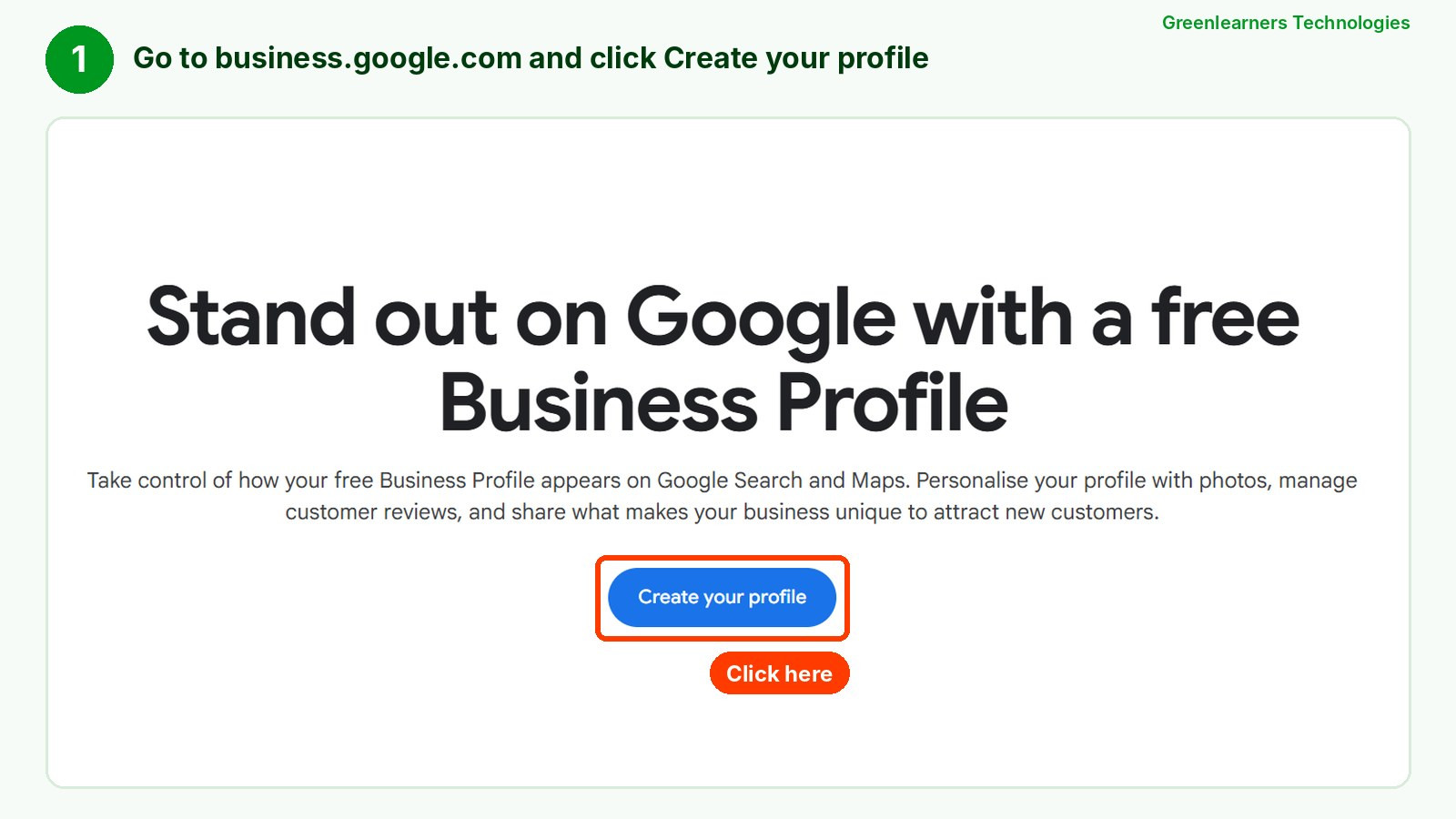
Step 1: Go to Google Business Profile and click Create your profile
Open business.google.com and sign in with the Google account you want to own the profile.
Click Create your profile (or Start now at the top). You can also go straight to business.google.com/add.
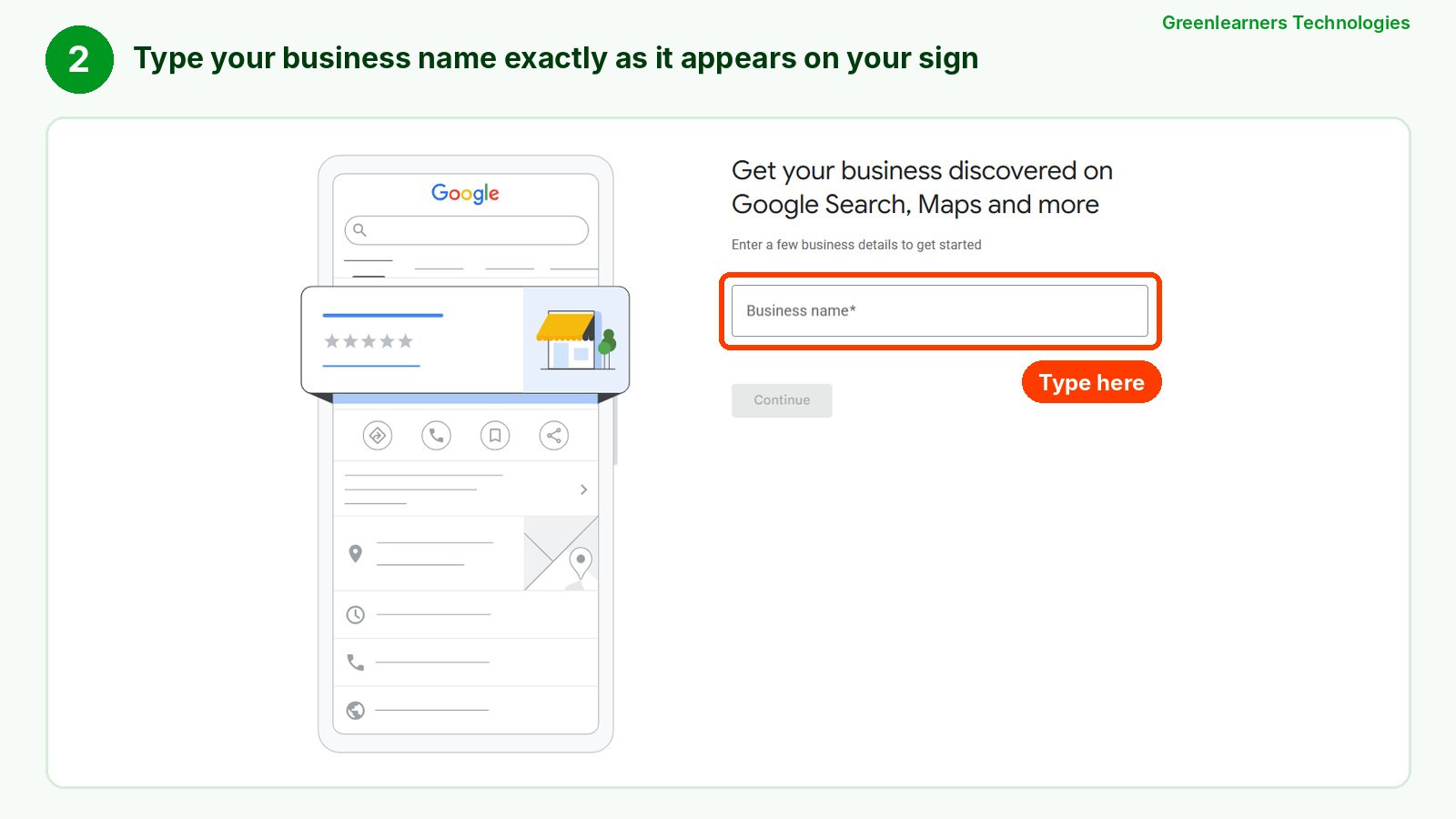
Step 2: Type your real business name
Enter the name on your shopfront and receipts, nothing more.
Google bans extra words such as taglines, locations or “best plumber” in the name, and it can suspend profiles that add them.
If your business already exists on Google, it will appear as you type. Select it and jump to the claiming section instead of creating a duplicate.
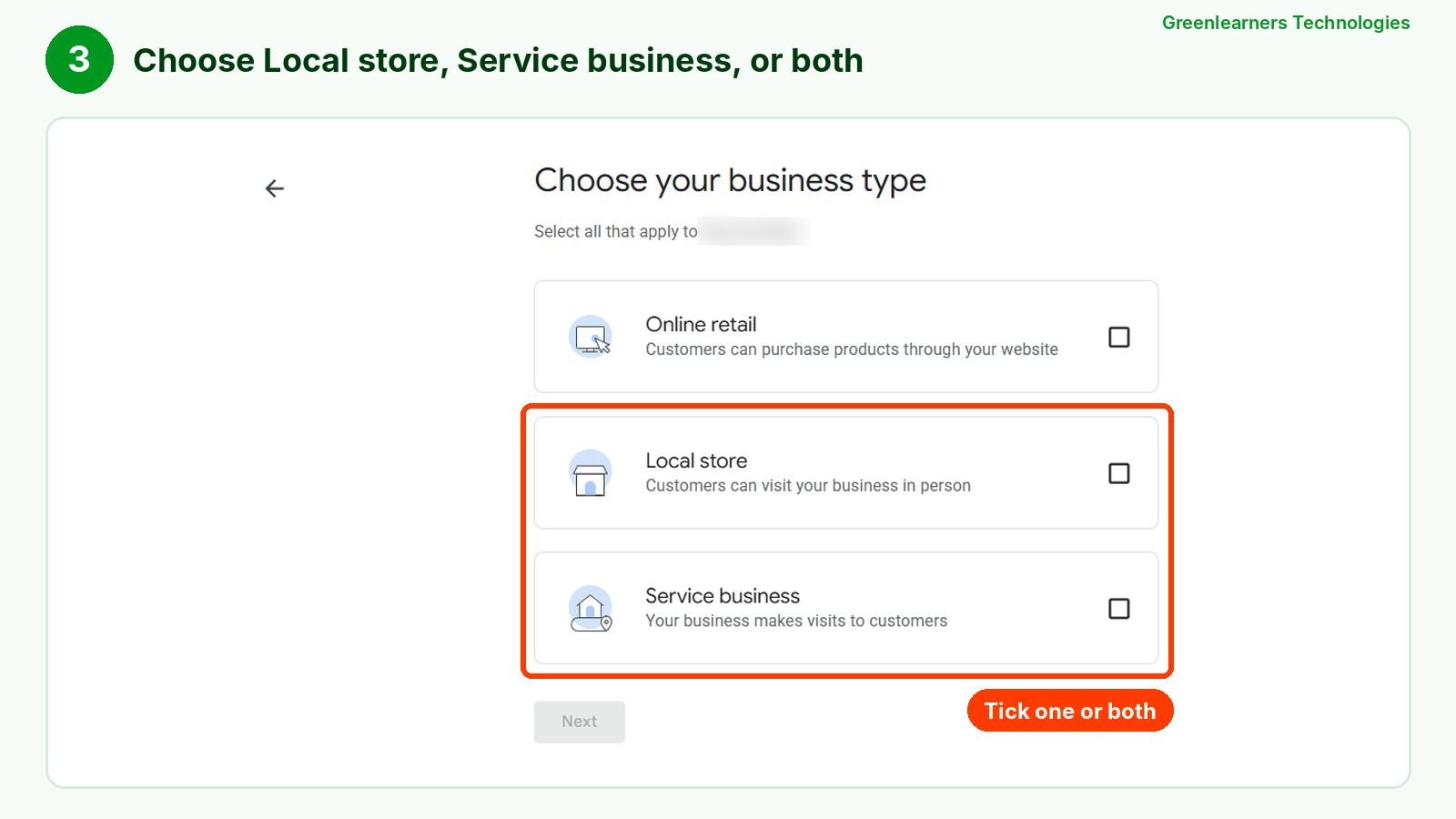
Step 3: Choose your business type
Google now asks what kind of business you run, and you can tick more than one.
- Local store: customers visit you in person. Tick this for shops, salons, pharmacies and offices.
- Service business: you visit customers. Tick this for plumbers, cleaners and mobile services.
- Online retail: customers buy on your website. On its own, this does not put you on the map.
To appear on Google Maps, you need Local store, Service business, or both.
Step 4: Add your online store, or skip
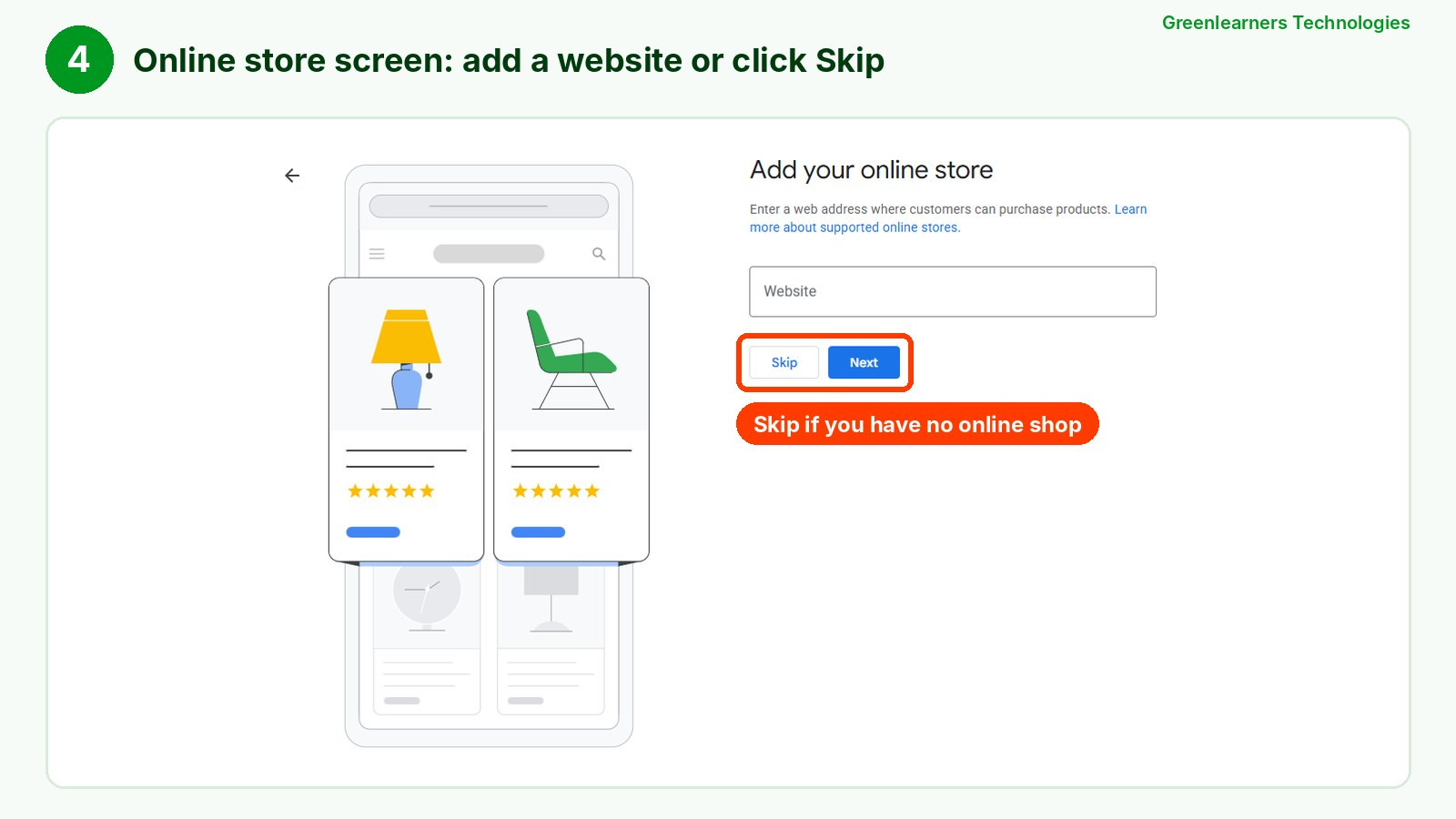
If you also ticked Online retail, Google asks for the website where customers can buy.
Add it if you have one. If not, click Skip.
Step 5: Choose your business category
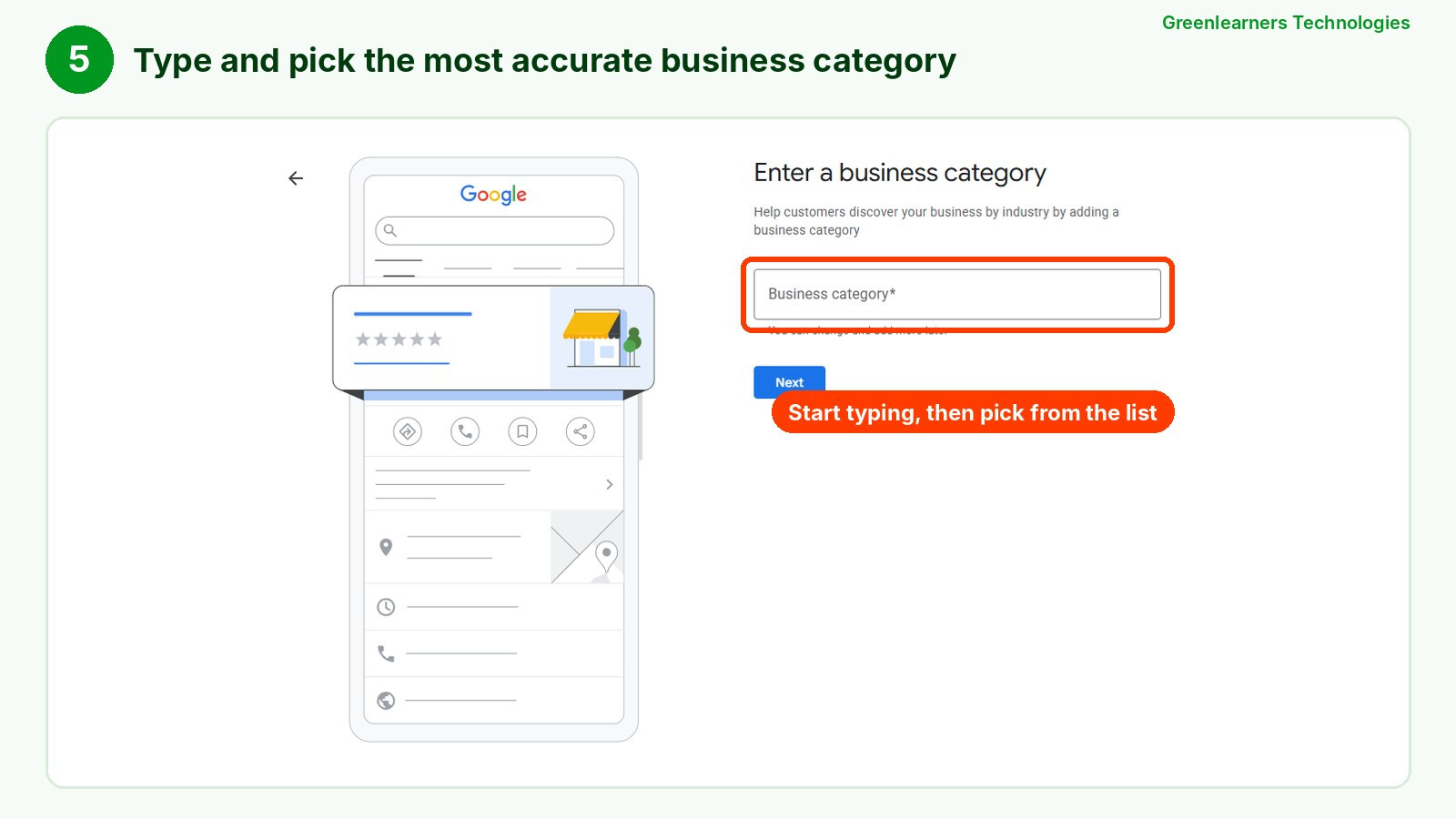
Start typing what you do and pick the most accurate primary category from Google’s list, such as “Nail salon” rather than “Beauty salon”.
The category helps Google understand which searches you are relevant for. You can change it and add more categories later.
Step 6: Enter your business address or service area
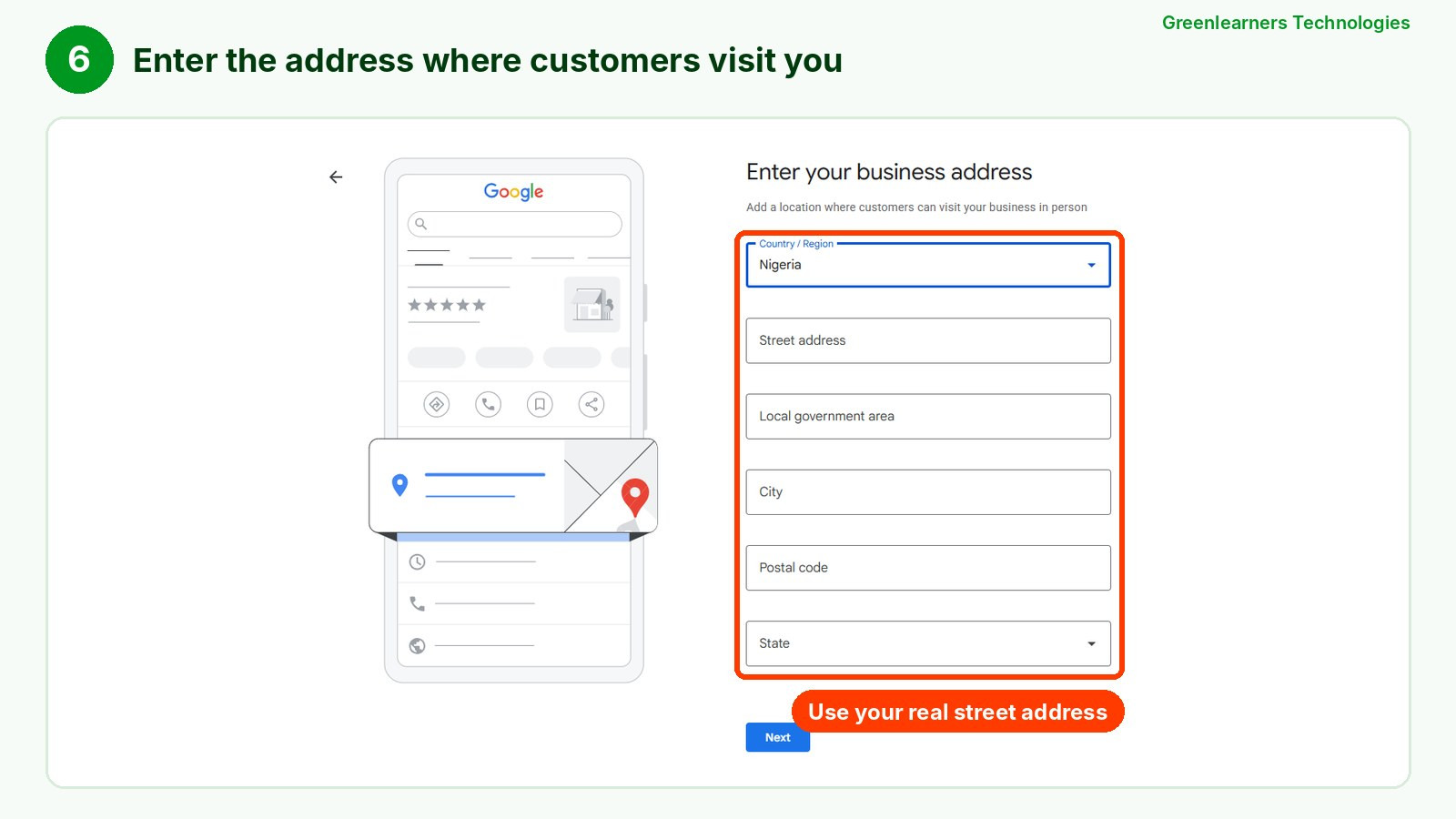
If customers visit you, enter your full street address. The fields change by country: our test shows Nigeria’s local government area and state, while the US asks for a state and ZIP code and the UK asks for a postcode.
If you chose Service business only, Google asks for the areas you serve instead, and your address stays hidden from customers.
If Google shows a map, drag the pin onto your exact entrance before you continue.
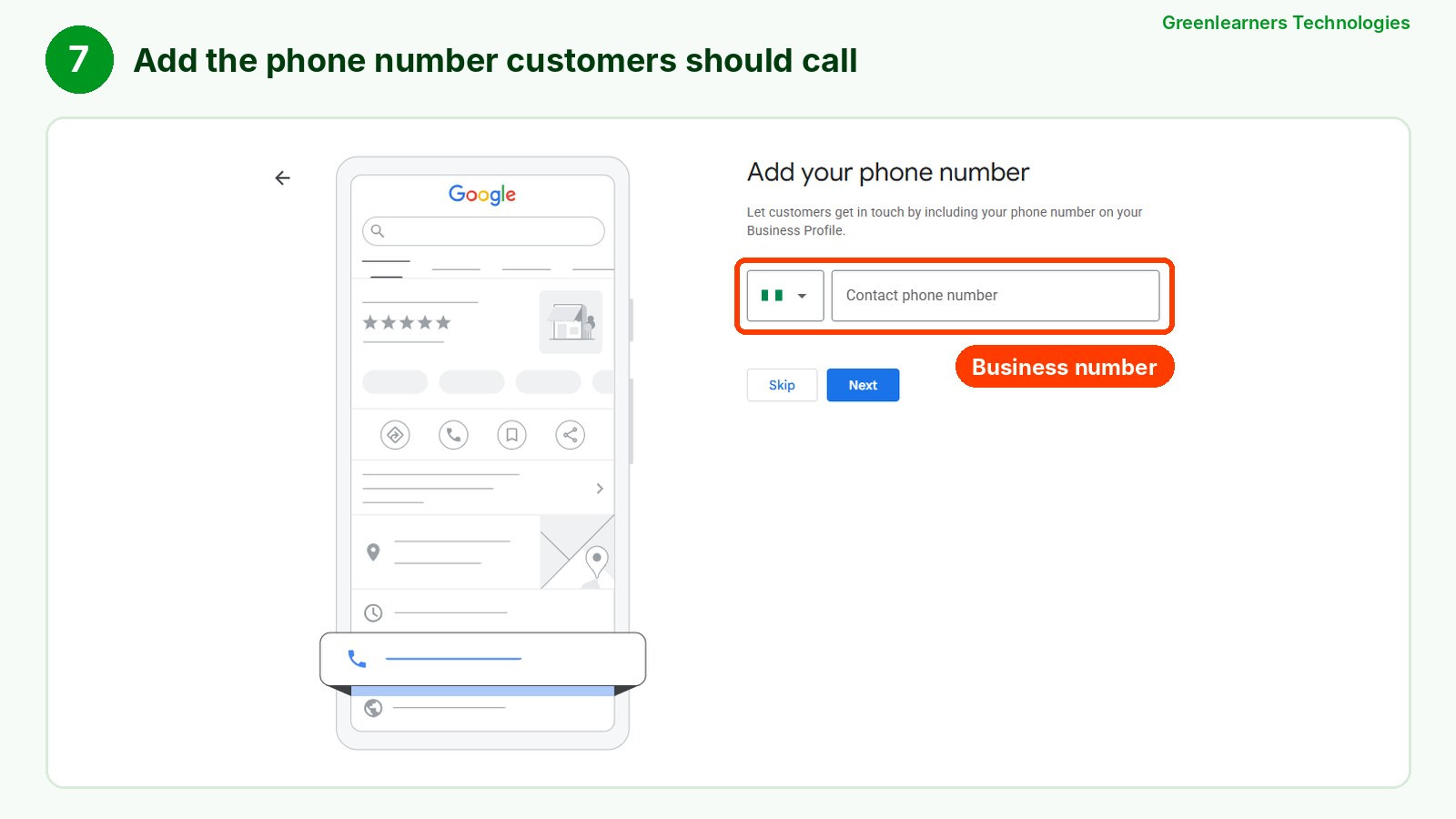
Step 7: Add your phone number
Add the number customers should call. It appears on your profile, so use a line someone actually answers.
Remember my Seb’s Hub call: a phone number that works can be the moment a searcher becomes a customer.
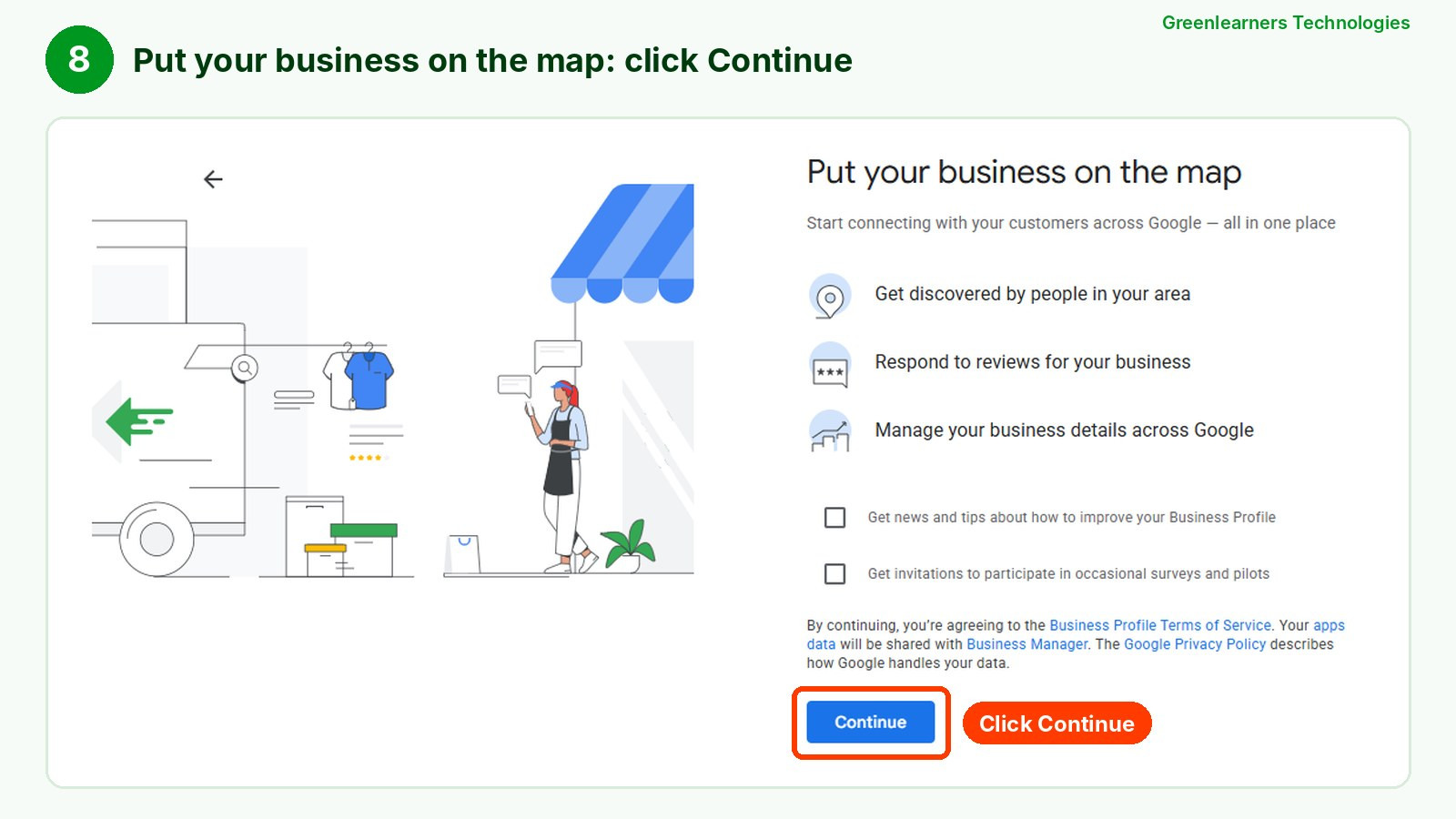
Step 8: Put your business on the map
In our test, this screen appeared right after the phone number. The exact order can differ for your business.
Choose whether you want Google’s tips and survey emails, then click Continue to accept the terms.
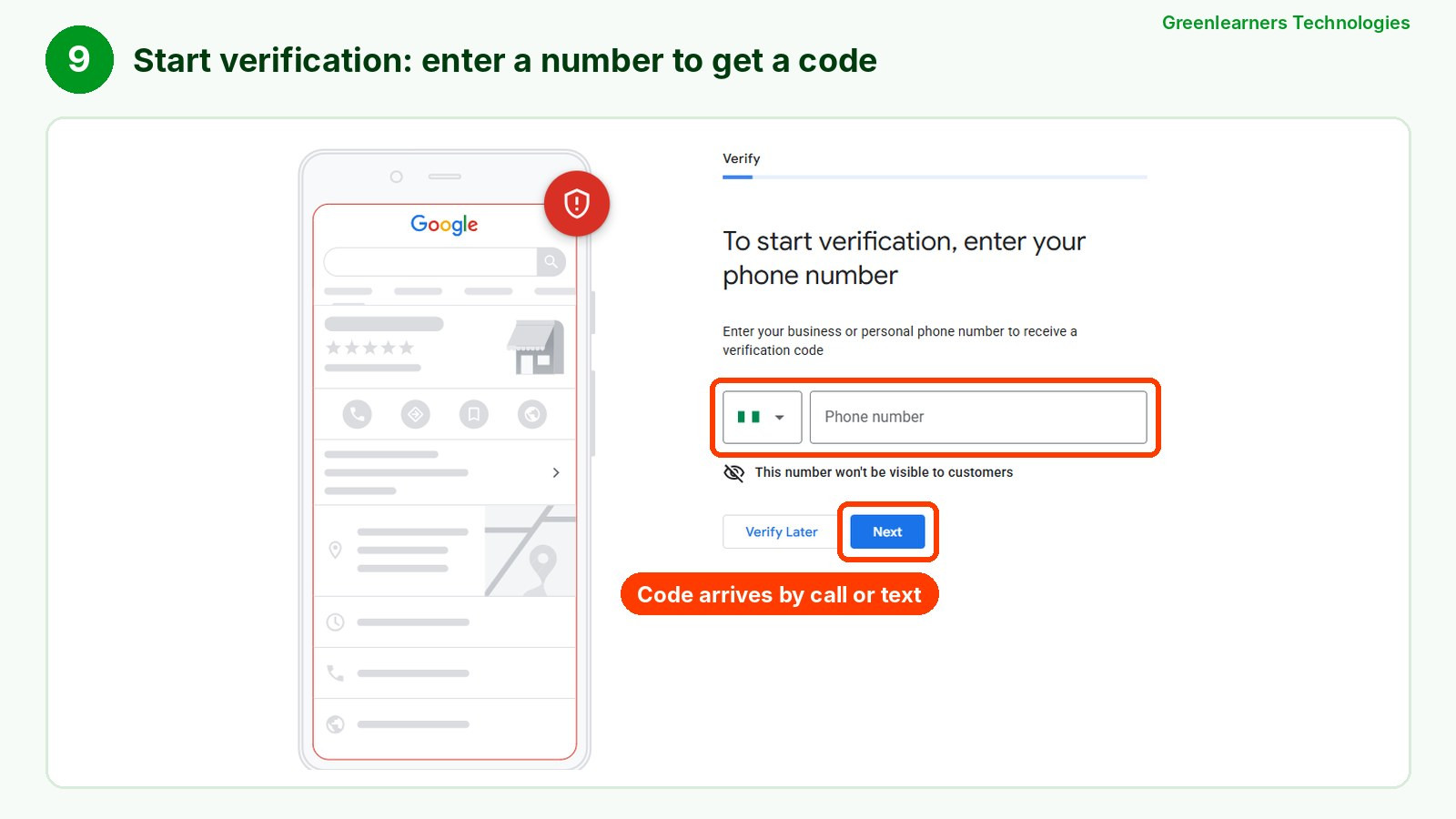
Step 9: Start verification
Verification is the final step of how to put your business on Google Maps. In our test, Google asked for a phone number to send a code.
Your business may be offered a different method, such as email, a video recording or a live video call. Google picks the options, and the verification section below shows how to pass first time.
You can click Verify Later, but your business will not show on Google Maps until verification is complete.
Step 10: Complete your profile while you wait
Add opening hours, photos, a short description, your services or products, and booking or ordering links.
A complete profile helps customers decide, and Google says complete, accurate information makes you more likely to show up in local results.
That is the whole answer to how to put your business on Google Maps, and it works the same in the US, the UK, Canada, Nigeria or anywhere else Google Maps works.
The steps for how to put your company on Google Maps are identical too, whether you are a one-person studio or a firm with fifty staff.
Send us your business name and city on WhatsApp. We will check what is blocking your profile and tell you the next step, free.
How To Add A Shop To Google Maps From Your Phone
How do you put your business on Google Maps if you only have a phone? You can still add a shop to Google Maps in a few minutes.
It is the quickest way to learn how to put your business on Google Maps while you are standing in your own shop.
- Open the Google Maps app on Android or iPhone and make sure you are signed in.
- Tap your profile picture in the top corner, then tap Add your business. On some phones this option sits under the Contribute tab.
- Follow the same steps as on a computer: name, business type, category, location and phone number.
- Choose a verification method. Video verification works especially well on a phone, because you film your shop as you stand in it.
So if you have been wondering how to add a shop in Google Maps, or how to put your shop on Google Maps without a laptop, this is it.
Adding a shop on Google Maps from a phone gives you exactly the same profile as doing it on a computer, so you can switch devices later.
One warning: Google Maps also has an Add a missing place option.
That is for customers suggesting a place, not for owners. It can put a pin on the map, but it does not give you control of the listing, your hours, photos or reviews.
Google points owners to a Business Profile instead, so always use Add your business for your own shop.
Already On The Map? How To Claim Your Business On Google Maps
Sometimes a business is already on Google Maps because a customer added it, or because Google created it from public information.
Search for your business name and town on Google Maps before you start, so you do not create a duplicate.
If you find it and nobody manages it yet, Google’s steps to claim it are short.
- Open the listing on Google Maps. On a phone, tap About first.
- Select Claim this business, then Manage now.
- Choose a verification method and complete it.
Claiming is still how to put your business on Google Maps: once you verify, the listing is yours to manage.
If someone else already manages it, such as a former employee or an old agency, you can request ownership. Google emails the current owner, who has 3 days to respond, and if they do not, you may be able to claim it yourself.
This is why the Google account you use matters: put the profile on a business account you control, then add staff or agencies as managers, never as owners.
If you plan to hire outside help, our guide to choosing search engine optimisation companies shows what to check before you hand over access.
How To Put Your Business Location On Google Maps Correctly
Getting the location right is a big part of how to put your business on Google Maps properly, because distance is one of the three things Google ranks local results on.
Follow the rule for your type of business.
Google’s service area rules also say you cannot set a radius around your business, so list real areas instead.
In places where street addresses are informal, such as many parts of Lagos, Nairobi or Accra, the map pin matters even more than the written address.
Most of those customers are searching on a phone: in Nigeria, mobile devices made up about three-quarters of web traffic in September 2026, as our digital marketing statistics report shows.
Zoom in and place the pin on your exact building or compound gate, and mention a well-known landmark in your business description and on your website so customers can find you.
Moving premises later? Edit the address on your existing profile instead of creating a new one, so you keep your reviews.
How To Verify Your Business On Google Maps Without Getting Stuck
Verification is the part of how to put your business on Google Maps where most people get stuck, and it decides whether you actually appear on the map.
Google picks which methods you get, and it says these can’t be changed, so prepare for whichever one appears.
| Method | How it works | Tip to pass first time |
|---|---|---|
| Video recording | You record a short, continuous video of your business | Google recommends it when it is offered. Plan your shots before you press record |
| Live video call | You show your business to a Google staff member on a call | Only available during your business hours, and you must be at the location |
| Phone or text | Google sends a code to the number you enter | Use a direct line, because automated phone menus cannot receive the code |
| Google sends a code to the email shown on screen | Make sure you can open that inbox before you choose it | |
| Postcard | A code arrives by post at your address | Usually arrives within 14 days and expires after 30 days, so do not edit your profile while you wait |
| Instant | Google verifies you straight away | Only in some cases, such as when your website is already verified in Google Search Console |
If you are offered a video recording, Google’s video verification guide is specific about what it wants to see. Prepare for your type of business.
Either way, record one take of at least 30 seconds, live, unedited and with no breaks. Home-based service businesses can film the signs and landmarks on their street.
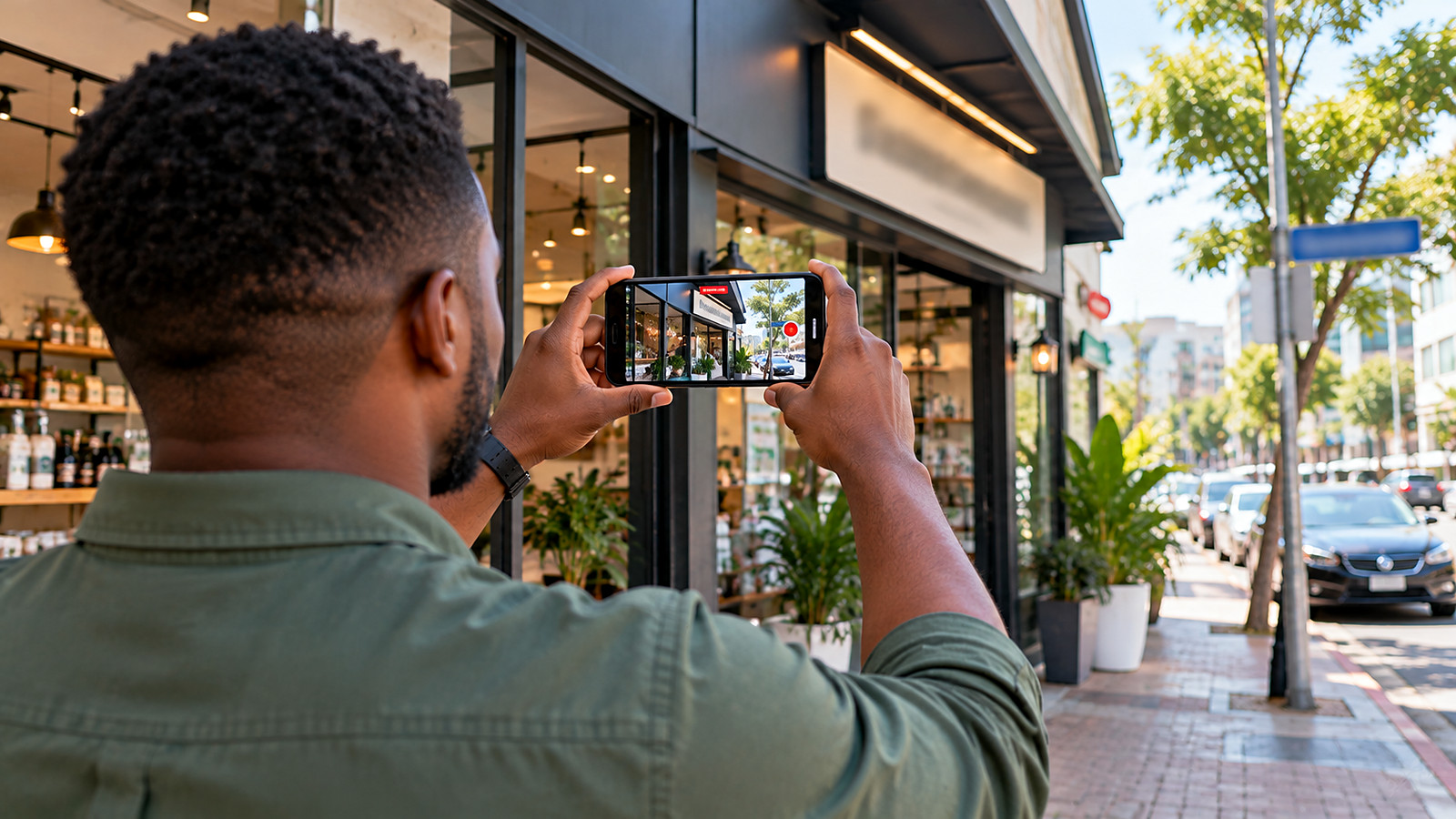
Once you submit, Google says reviews take up to 5 business days, and sometimes longer.
If your video is rejected, record a new one that shows everything from the first video plus whatever was missing. No checklist can guarantee approval, but these are the things Google asks for.
What Went Wrong? Quick Fixes For Common Google Maps Problems
Here is what to check first when something goes wrong, with the official Google page for each problem.
| Problem | Likely cause | What to do first |
|---|---|---|
| Video verification rejected | Location, signage or proof of management was not clear | Re-record with everything from the first video plus what was missing. Video guide |
| “This business is already managed” | A former staff member, agency or old account owns it | Request ownership; the owner has 3 days to respond. Request ownership |
| Profile suspended | A guideline issue, such as extra words in the name or an ineligible address | Fix the issue, then use Google’s appeals tool. Appeals can only be submitted once, and never create a new profile. Fix suspended profiles |
| Two listings for one business | A duplicate was created by you or a customer | Keep the one with your reviews and resolve the other through Google. Duplicates help |
| Verified but hard to find | Weak relevance or prominence for that search | Search your exact business name first. If you show up, work on category, reviews and website. Ranking section |
| Pin in the wrong place | The address was geocoded to the wrong spot | Edit the location in your profile and move the pin to your entrance |
What To Do Once Your Business Is On Google Maps
Knowing how to put your business on Google Maps gets you listed. What you do next decides whether people choose you.
Google says customers are 2.7 times more likely to consider a business reputable if they find a complete Business Profile, and 70% more likely to visit it.
Then start collecting reviews from happy customers straight away, and reply to every one, good or bad. Our reputation management services can help if reviews are a weak spot.
In BrightLocal’s 2026 survey of US consumers, 97% said they read reviews for local businesses, and 68% will only use a business rated four stars or higher.
And Google’s own 2016 research found that 76% of people who searched on their phone for something nearby visited a related business within a day. The figure is old, but the habit it describes has only grown.
How To Rank Your Business On Google Maps
Knowing how to put your business on Google Maps is step one. Ranking higher on the map is step two.
In SOCi’s 2026 study of nearly 350,000 locations from multi-location brands, those brands appeared in Google’s top three local results only 35.9% of the time. Even big names miss the top spots.
Google says local results are based mainly on three things.
Google is also clear that there is no way to request or pay for a better local ranking. Ads can appear above the map, which is what Google Ads are for, but the free results are earned.
Here is how to rank your business on Google Maps in practice:
- Get the category right. In Birdeye’s 2026 study of large brands, about 86% of profile views came from category searches such as “dentist near me”, not from people typing a business name. An accurate category helps Google match you to those searches.
- Win steady, genuine reviews. Ask every happy customer, and follow Google’s tips to get more reviews, such as sharing a review link or QR code. Never buy or fake reviews, which Google’s content policy prohibits.
- Keep your business details accurate and consistent on your website, social pages and other maps and directories, such as Bing Places and Apple Business Connect.
- Build a strong website with a page for each main service and location, linked from your profile, and well-written service pages. Google’s local business structured data can also help it understand your hours and location. A fast, clear business website is the heart of local SEO services.
- Keep the profile fresh. Regular photos, offers and updates show customers you are active, and answering calls and enquiries quickly turns views into visits.
Search is changing too: in the same BrightLocal survey, 45% of US consumers said they use ChatGPT or other AI tools for local recommendations.
Accurate business details, credible reviews and a useful website can help customers, and may help some AI tools, understand your business. No single profile guarantees an AI recommendation.
Our guide to search engine optimization explains how your website and your map listing work together, our SEO vs digital marketing guide shows where Google Maps fits in your wider marketing, and our AI SEO services cover visibility in AI answers.
How To Tell If Google Maps Is Bringing You Customers
Learning how to put your business on Google Maps and rank higher only pays off if it brings in customers, so measure results, not just how good the profile looks.
Your profile’s Performance report shows how many people viewed it, the searches they used, and how many asked for directions, called or clicked to your website. It is only available once you are verified.
- Note your calls, direction requests and website clicks for the month before you improve your profile.
- Ask every new customer how they found you, and record the answer.
- Compare the numbers again after 30, 60 and 90 days.
Remember that a click is not a sale. Count real enquiries, bookings and sales separately, and our analytics and tracking services can set this up for you.
If plenty of people view your profile but few call or visit, the problem is usually your offer, photos or website, which is where conversion rate optimization helps.
Free Google Maps Readiness Check
This 2-minute check covers the key steps of how to put your business on Google Maps and rank there. Tick what is already true, and it shows what to fix first.
8 Mistakes That Keep Businesses Off Google Maps
Most problems with how to put your business on Google Maps come from a handful of avoidable mistakes.
Let us use a hair salon in Manchester as an example of how to put your business on Google Maps in real life.
The owner adds the business with its real name, ticks Local store, picks “Hair salon” as the primary category and places the pin on the salon door, not the car park.
She records a 40-second video showing the street sign, the salon sign above the window and herself unlocking the stock room.
Once she is approved, she adds 15 photos, lists her prices for cuts and colour, and texts every client a review link after their appointment.
A pharmacy in Lagos would do the same, with one extra habit: keeping its opening hours exact, including public holidays, because customers check them before they leave home.
A mobile mechanic in Houston would tick Service business instead, hide his home address, add the ZIP codes he covers, and film his van, tools and a job in progress.
Want us to set up and rank your business on Google Maps?
You can follow this guide and do it yourself. If you would rather have it done properly, our local SEO services cover the full job.
We create or claim your Google Business Profile, guide you through verification, fix your category and location settings, then work on the reviews, website and local signals that help you rank.
- Profile set up or claimed, and verified
- Category, location and details optimised
- A clear plan to rank higher on the map
Start with a free review: send your business name and city on WhatsApp, plus your website if you have one. No obligation to hire us, and no one can promise a top ranking.
Questions About How To Put Your Business On Google Maps
Create a free Google Business Profile at business.google.com/add, enter your business name, business type, category, address or service area and phone number, then verify that you own the business.
Once Google approves the verification, your business can appear on Google Maps and Google Search.
Yes. Google renamed Google My Business to Google Business Profile in November 2021.
It is the same free tool, and it is still how to put your business on Google Maps today.
You do not need two listings. The same free Google Business Profile shows your business on Google Search and Google Maps.
A website with a page for each main service then helps you appear in the normal search results too.
Yes. Google says you can add or claim your business at no charge, and it is free to keep it there.
You only pay if you choose to run Google Ads or hire someone to manage your profile.
The setup part of how to put your business on Google Maps takes most owners around 20 minutes, by our estimate. Google says verification reviews take up to 5 business days, and postcards usually arrive within 14 days.
Your business can appear on the map once it is verified.
Yes, if you serve customers at their location. Tick Service business, add the towns or postal codes you cover, and keep your address hidden.
Virtual offices and P.O. boxes are not allowed, so you still need a real address to verify.
Not with a standard listing. Google requires in-person contact with customers, either at your location or at theirs.
If you only sell online and ship products, focus on your website and search engine optimization instead.
The usual reasons are that verification is not finished, the profile was suspended for breaking a guideline, or a duplicate listing is splitting your details.
If you are verified but hard to find, work on your category, reviews and website, because ranking depends on relevance, distance and prominence.
Open Google Maps, search for the address and use Add a missing place. Google reviews the suggestion before it goes live.
Only the owner can manage the listing, so if it is your business, use Add your business instead.
Yes. A website is optional, and you can skip the website screen during setup.
A good website does help you rank higher, though, because it adds to your prominence on Google.
Open your Business Profile, choose Edit profile, then Location, and update the address or move the pin.
Edit the existing profile rather than creating a new one, so you keep your reviews. Google may ask you to verify again.
Google ranks local results mainly on relevance, distance and prominence, and it says no one can pay for a better ranking.
Choose an accurate category, complete every part of your profile, earn genuine reviews and reply to them, and link to a strong website.
No. The steps for how to put your business on Google Maps are the same in every country where Google Maps works, including the US, the UK, Canada and Nigeria.
The address fields and verification methods can differ by country, and in areas with informal addresses, an accurate map pin matters most.
Yes. An agency or staff member can set it up, but make sure the profile is owned by a Google account your business controls.
Add them as managers, so you keep the listing and your reviews if you part ways. That is the safest way to put your business on Google Maps with outside help.
Disclaimer
Greenlearners Technologies is not affiliated with Google. Google, Google Maps and Google Business Profile are trademarks of Google LLC, and the screenshots show Google’s own sign-up screens for teaching purposes.
The steps in this guide to how to put your business on Google Maps were checked against Google’s help pages and a test profile on October 15, 2026. Google changes its tools often, so the exact screens, order and verification options you see may differ.
No one can guarantee a ranking on Google Maps, and the readiness check is a starting guide, not a promise of results.
- Google Business Profile Help. Add or claim your Business Profile on Google. support.google.com
- Google Business Profile Help. Verify your business on Google. support.google.com
- Google Business Profile Help. Verify your business with a video recording. support.google.com
- Google Business Profile Help. Guidelines for representing your business on Google. support.google.com
- Google Business Profile Help. Tips to improve your local ranking on Google. support.google.com
- Google Business Profile Help. Manage your service area. support.google.com
- Google Business Profile Help. Choose a business category. support.google.com
- Google Business Profile Help. Request ownership of a Business Profile. support.google.com
- Google Business Profile Help. Fix suspended or disabled profiles. support.google.com
- Google Business Profile Help. Business Profile performance. support.google.com
- Google Business Profile Help. About Business Profiles. support.google.com
- Google Maps Help. Add, fix or remove a place. support.google.com
- Search Engine Land (2021). Google My Business now known as Google Business Profile. searchengineland.com
- Think with Google (2016). Mobile search trends: consumers to stores. thinkwithgoogle.com
- BrightLocal (2026). Local Consumer Review Survey. brightlocal.com
- Birdeye (2026). State of Google Business Profile. birdeye.com
- Search Engine Land (2026). SOCi local visibility report. searchengineland.com