

Your customers are already on WhatsApp. The question is whether they’re buying from YOU there.
More than 3 billion people in over 180 countries use WhatsApp.
They message family, friends, banks, salons, landlords and their favorite shops on it.
Meta says more than 2 billion people use it every day.
Meta says there are now more than one billion active conversations with businesses across WhatsApp, Messenger and Instagram every day.
Here’s what that means for you: WhatsApp is where many buying decisions now happen, one chat at a time.
A customer sees your product on Instagram, Google Maps or a friend’s Status.
They have one question.
“How much?” “Do you deliver to me?” “Is it original?”
The business that replies fast, clearly and confidently gets the sale. The one that replies tomorrow gets forgotten.
Yet most businesses use WhatsApp like a phone line, not a sales channel.
No catalog, no greeting, no follow-up.
Just random broadcasts that get them blocked.
This guide fixes that.
You’ll learn how to sell on WhatsApp Business step by step: set up your profile and catalog, get more people to message you, run the sales conversation word for word, take payment in your country, and follow up so customers buy again.
Then you’ll get 12 effective WhatsApp marketing strategies, playbooks for 12 industries, a copy-and-paste template kit and 3 free tools.
Whether you sell fashion in Lagos, run a clinic in London, a restaurant in Mumbai or an online store in Texas, the goal is the same:
Turn chats into customers, and customers into repeat buyers.
To sell on WhatsApp Business, set up a complete business profile and catalog, switch on greeting and away messages, and share your WhatsApp link everywhere customers find you.
Then reply within minutes, recommend 2 or 3 products, send a clear order summary and payment link, and follow up with delivery updates and reorder reminders.
That’s WhatsApp marketing done right: helpful one-to-one chats, plus marketing messages only to people who opted in.
Published October 16, 2026 · 12 strategies, 12 industries, 3 free tools · By Chukwuemeka Maduka
- What WhatsApp marketing is, and why it works
- WhatsApp Business app vs Platform (API)
- How to set up WhatsApp Business to sell
- How to get more people to message you
- How to sell on WhatsApp Business: the 10-step sales conversation
- How to take payment, country by country
- Status, Channels, broadcasts and groups
- How to use WhatsApp Communities to get leads and sell
- 12 effective WhatsApp marketing strategies
- Templates you can copy, plus a message checker
- Automation and AI agents
- WhatsApp Business Platform pricing, explained simply
- How to avoid getting your number banned
- How to measure your WhatsApp marketing
- Playbooks for 12 industries
- WhatsApp marketing rules by country
- 10 WhatsApp marketing mistakes
- Your 30-day WhatsApp launch plan
- Questions people ask
What Is WhatsApp Marketing? And Why Does It Work?
WhatsApp marketing is using WhatsApp to attract customers, answer their questions, sell to them and keep them coming back, through one-to-one chats, Status, Channels and messages they’ve agreed to receive.
It works because it meets people where they already spend their day.
In some markets, it’s close to universal.
In Nigeria and Morocco, 98.3% of internet users surveyed said they’d used WhatsApp in the past month.
And it’s personal. A chat feels like talking to a person, not reading an ad.
That’s why it’s so good at building the trust that closes a sale.
Real businesses selling on WhatsApp
These results come from WhatsApp’s own success stories. Meta notes they’re self-reported by the businesses.
| Business | What they did | Reported result |
|---|---|---|
| Art di Cacao, Mexico | Click-to-WhatsApp ads optimized for purchases | 56% more purchases, with WhatsApp driving 50% to 60% of monthly sales |
| Reen Naturals, India | Broadcasts and automated message journeys | 11.7X return on messaging spend |
| GummiTiles, Mexico | A team of six using an AI agent on WhatsApp | 4X better conversion rate and 50% more sales |
| TriHealth, Malaysia | Marketing messages through Ads Manager | 48% higher sales and 49% lower cost per purchase |
| Donna Capilli, Brazil | Selling hair care through local chats | Half of its sales came from local customers chatting on WhatsApp |
You’ll see “WhatsApp has a 98% open rate” on almost every marketing blog. We traced it, and the sources point to each other in a circle, with no study we could find behind them.
Real numbers are still strong. Reen Naturals reported read rates of 75.8% on broadcasts and 83.8% on automated journeys. Plan with real data, not a recycled statistic.
WhatsApp Business App vs Platform (API): Which Do You Need?
Before you learn how to sell on WhatsApp Business, pick the right version.
WhatsApp offers two main products, plus a newer way to use both together.
| WhatsApp Business app | WhatsApp Business Platform (API) | Coexistence | |
|---|---|---|---|
| Best for | Small businesses replying personally | Growing and large businesses messaging at scale | App users who need to scale without losing their number |
| Cost | Free, with paid extras such as Meta One | Per-message fees, plus your provider’s fee | Platform fees for messages sent through the Platform |
| Who replies | You, on your phone and linked devices | A team through a shared inbox, chatbots and AI agents | You on the app, and your team on the Platform |
| Marketing messages | Broadcast lists, and Business Broadcasts in select countries | Approved marketing templates to opted-in customers | Through the Platform |
| Setup | Download and go, in minutes | Directly with Meta or through a provider, usually within days | Connect your app number to a provider |
Coexistence lets you keep using the app and connect the same number to the Platform.
There are trade-offs: broadcast lists become read-only and groups don’t sync, so check the details with your provider first.
Whichever you choose, the WhatsApp marketing basics in this guide stay the same.
A simple rule of thumb from our client work: if one person can handle the chats, start with the app.
If you need a team, automation or messages to thousands of people, move to the Platform.
Free WhatsApp Setup Chooser
Answer four questions to see which setup fits your business today.
How To Set Up WhatsApp Business To Sell (Step By Step)
Your setup is the first step in how to sell on WhatsApp Business.
It’s your shop window: get it right once, and every chat starts closer to a sale.
These steps use the free WhatsApp Business app, which is where most small businesses start.
Platform users set up the same things through their provider.
The screenshots below are real, taken from our own WhatsApp Business account in October 2026, so you can follow along tap by tap.
Step 1: Use a dedicated business number
Download the WhatsApp Business app and register it with a number that belongs to the business, not your personal line.
If a staff member leaves, the number, the chats and your customers stay with you.
Step 2: Complete your business profile
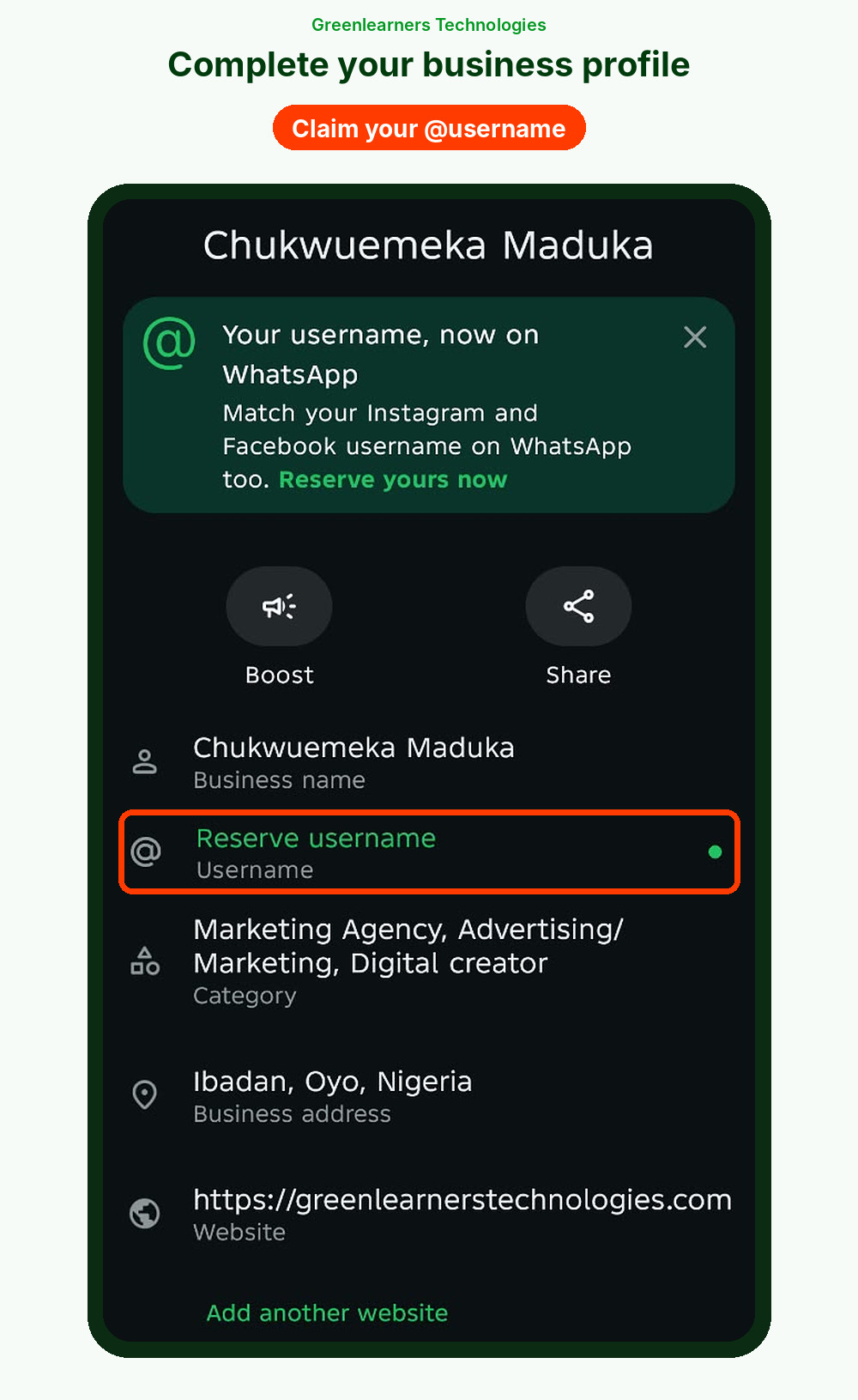
Your profile is the first thing a new customer checks before they trust you. Fill in every field:
- Name and logo exactly as customers know you.
- Category, such as clothing store, restaurant or beauty salon.
- Description: what you sell, who for, and where you deliver, in two lines.
- Hours, address, email and website, so people can check you’re real.
- Your @username. WhatsApp now lets businesses reserve a username, so match the one you use on Instagram and Facebook.
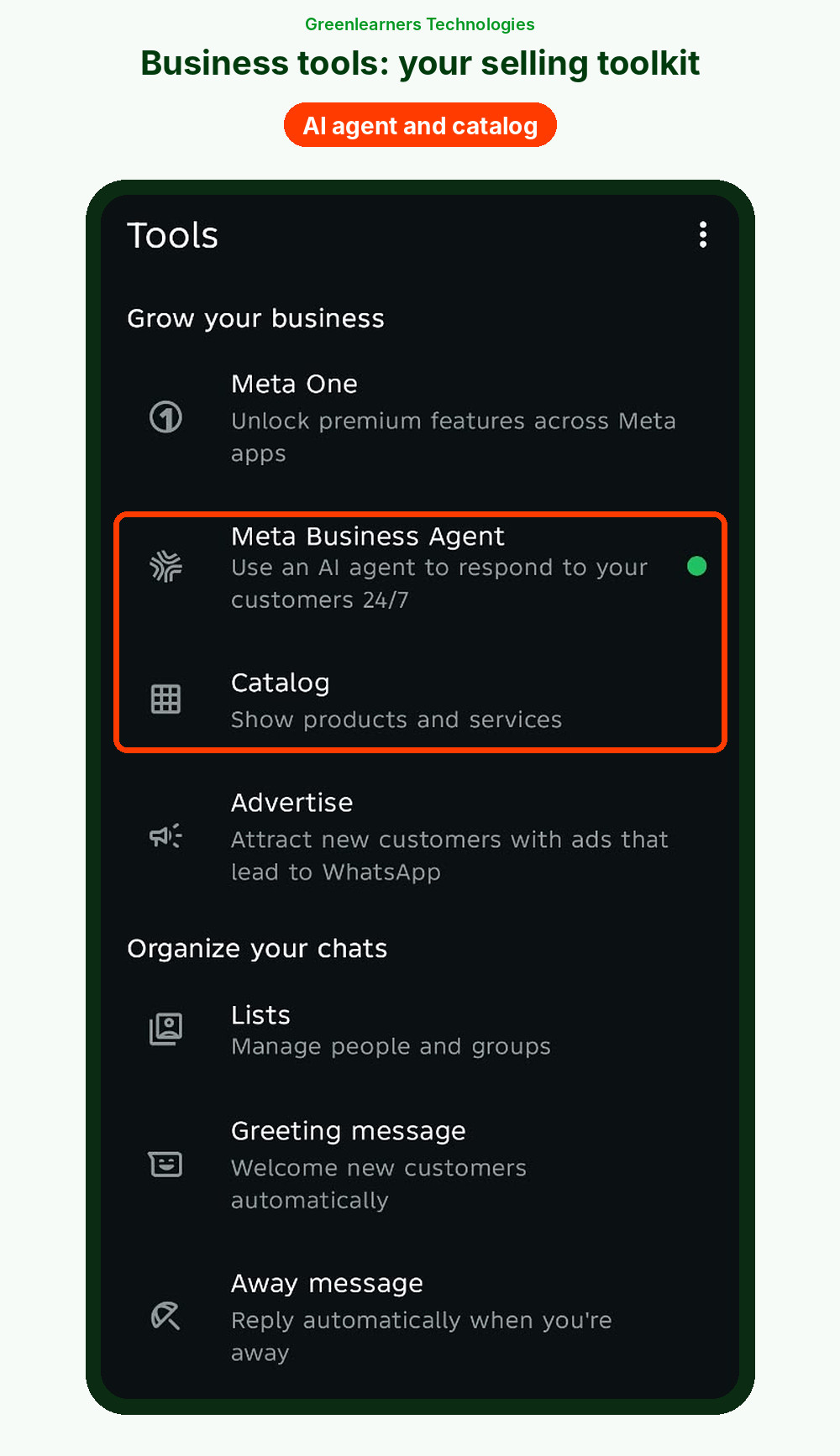
Everything lives in the Tools tab at the bottom of the app: your profile, catalog, greeting and away messages, quick replies, lists, ads and the Meta Business Agent.
Step 3: Build a catalog that sells
A catalog turns “send me prices” into “I’ll take this one.”
Customers can browse, ask about an item and add it to a cart, all inside the chat.
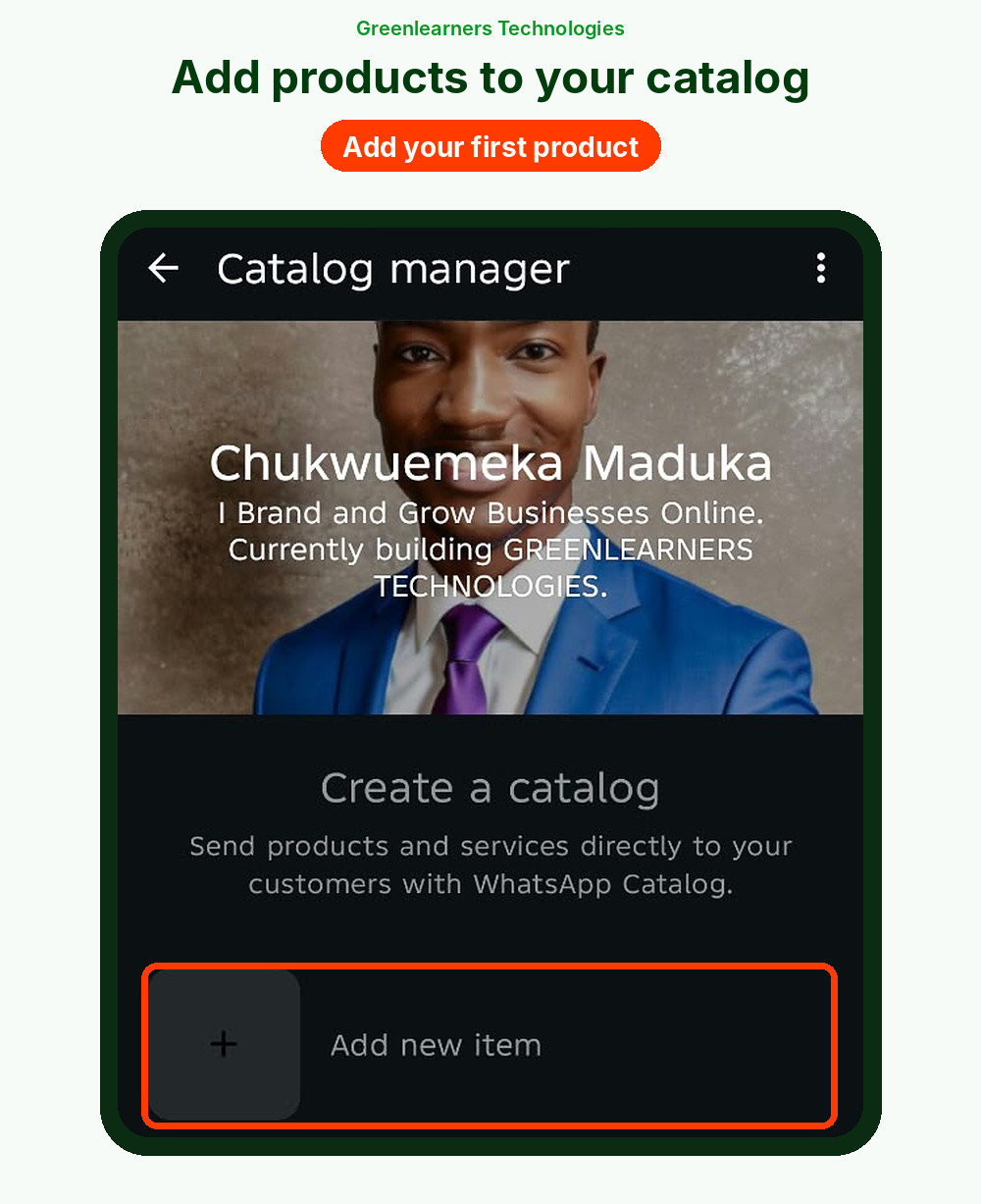
WhatsApp’s catalog guide shows how to add products or services with photos, prices, descriptions and links, and group them into collections.
- Use clear photos on a plain background, plus one photo of the item in use.
- Put the price in every item. Hidden prices create back-and-forth and lost sales.
- Group items into collections, such as “New in,” “Under $50” or “Best sellers.”
- Hide sold-out items instead of deleting them, so you can bring them back.
Step 4: Turn on your greeting and away messages
A greeting message goes out automatically when someone messages you for the first time, or after 14 days of no activity.
An away message answers when you’re closed, on a schedule you choose.
Both stop a new lead from feeling ignored.
Open the Tools tab, tap each one, switch it on and write your own message.
You’ll find ready-to-use wording in the template kit below.
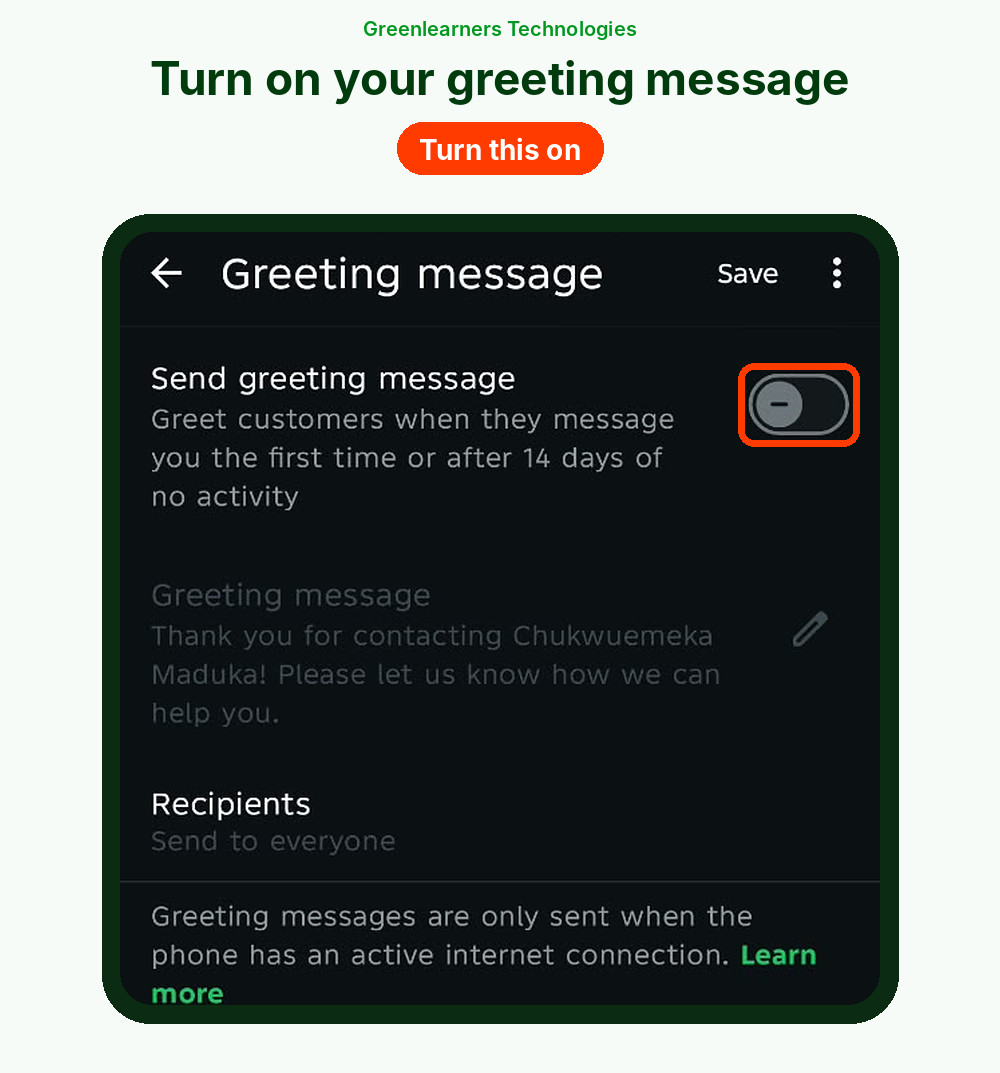
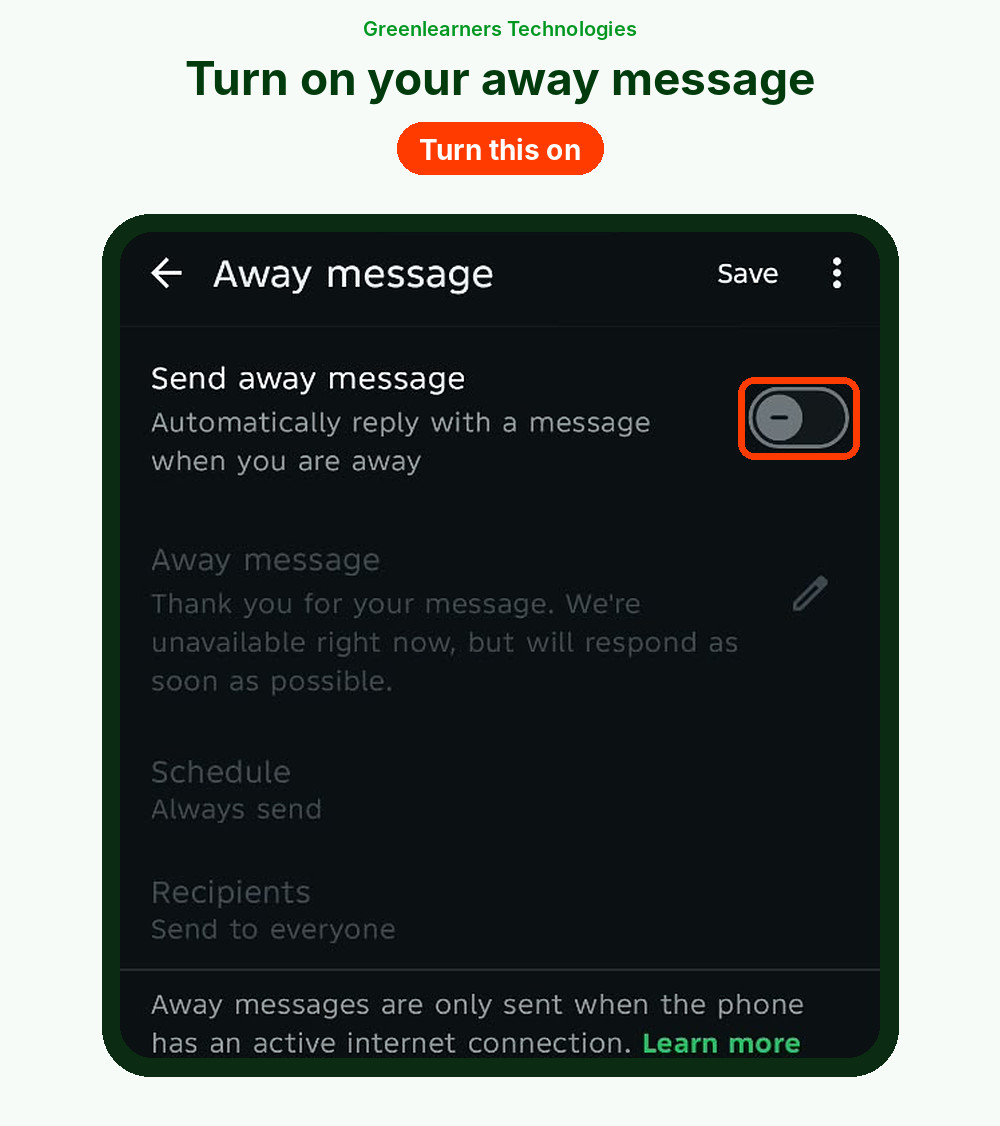
One catch: both only send when your phone is connected to the internet, as the app itself warns.
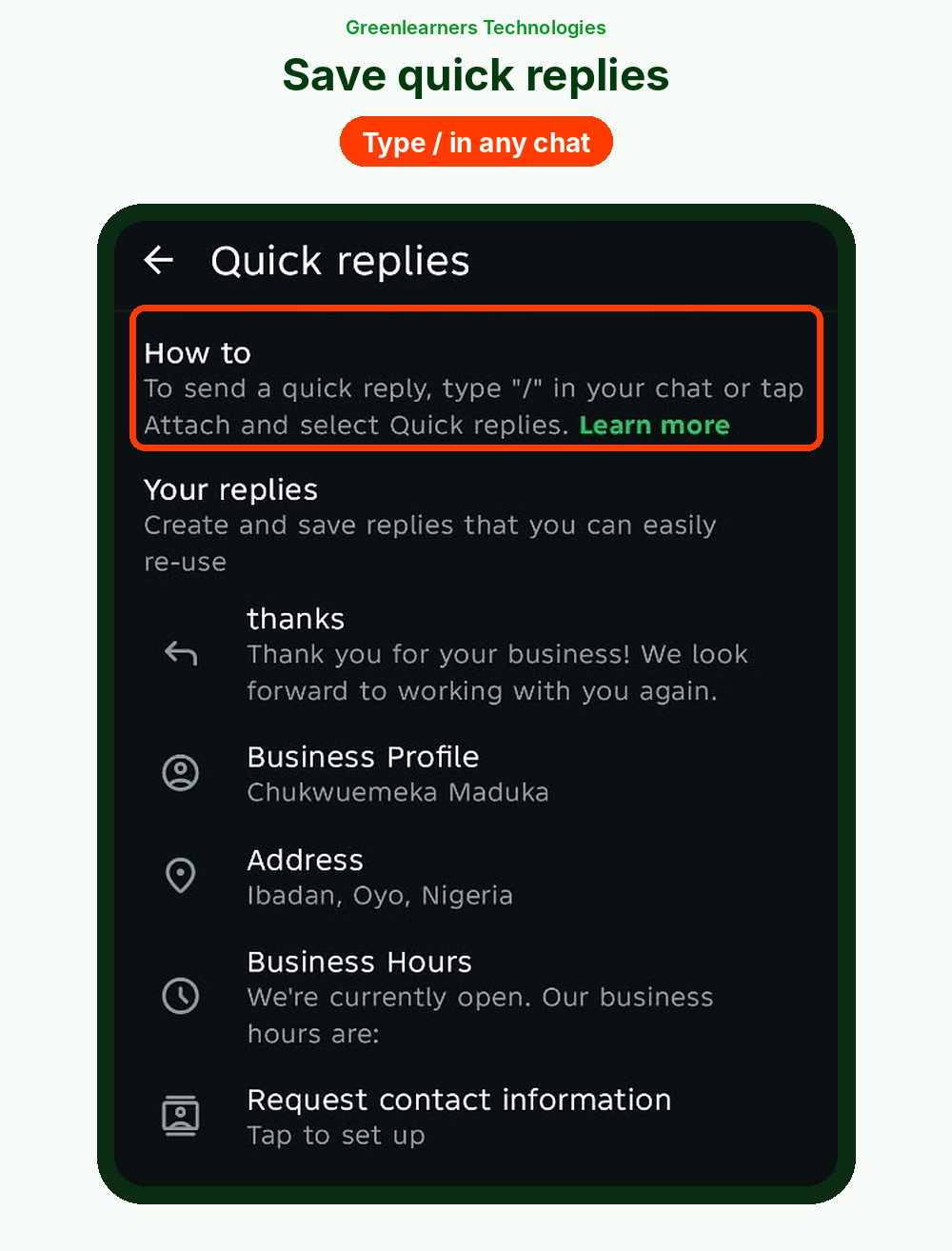
Step 5: Save quick replies for your top questions
Quick replies are saved answers you send by typing / in any chat, then picking the reply, like /price or /delivery.
WhatsApp suggests starting with your five most common questions.
Most sellers need price, delivery, payment, location and order status.

Step 6: Use lists to track every sale
Lists (once called labels) sort your chats so nothing slips. Find them under Tools, then Lists.
Try this simple pipeline:
New leadPending paymentPaidShippedVIP
At the end of each day, open “Pending payment” and follow up. That one habit recovers sales most sellers forget.
Step 7: Get your short link and QR code
WhatsApp gives every business a short link and a QR code that open a chat with you.
You can also add a ready-made message customers can edit and send.
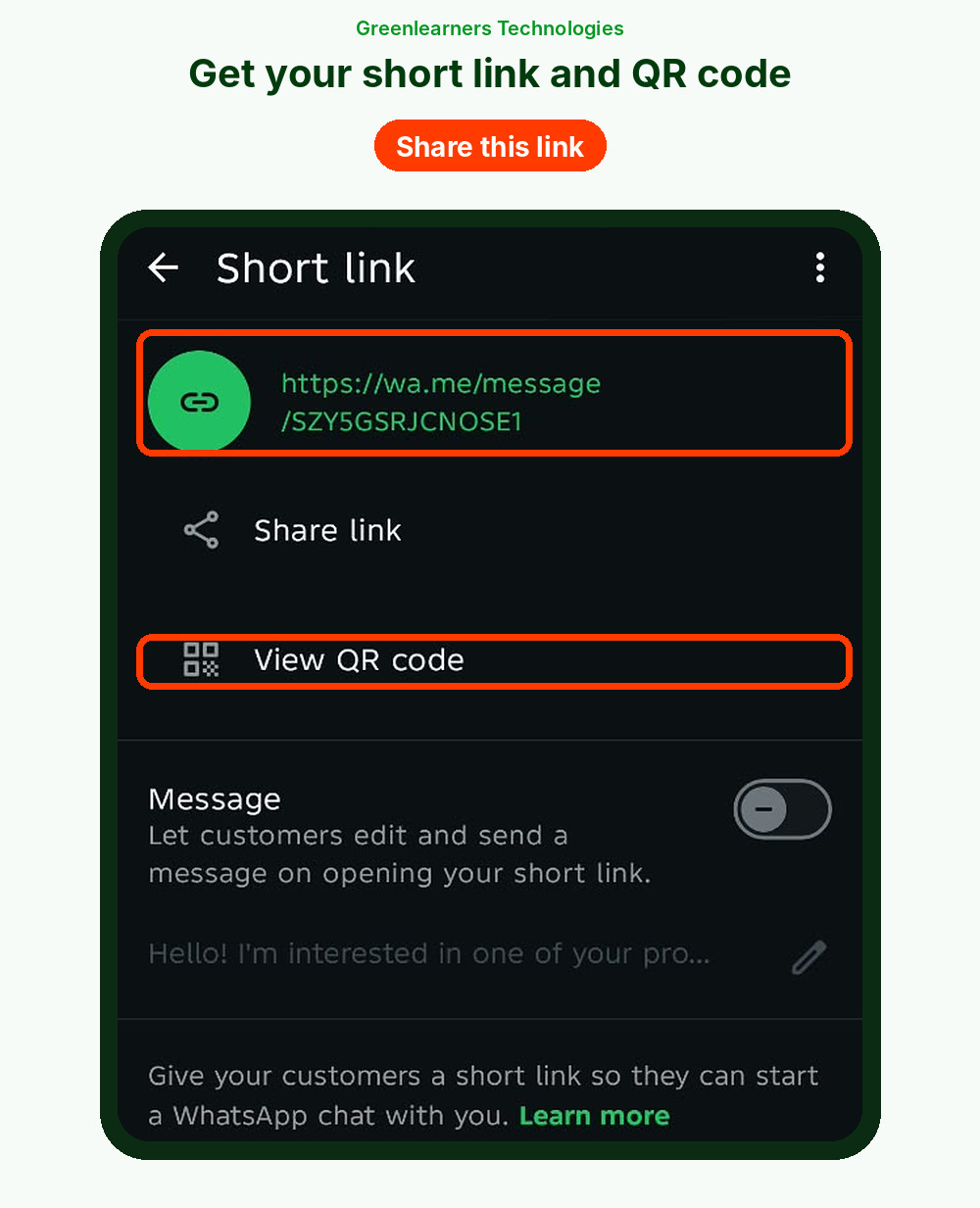
Or build your own trackable link with the free WhatsApp link generator further down.
How To Get More People To Message You (And Opt In)
Every WhatsApp marketing plan starts with getting more chats.
On WhatsApp, the customer usually starts the conversation.
Your job is to make that first message easy, and to collect permission for the messages you send later.
The WhatsApp Business Messaging Policy is clear: only contact people who gave you their number, and get their opt-in before you send them messages they didn’t ask for.
Here are 12 proven ways to start more chats:
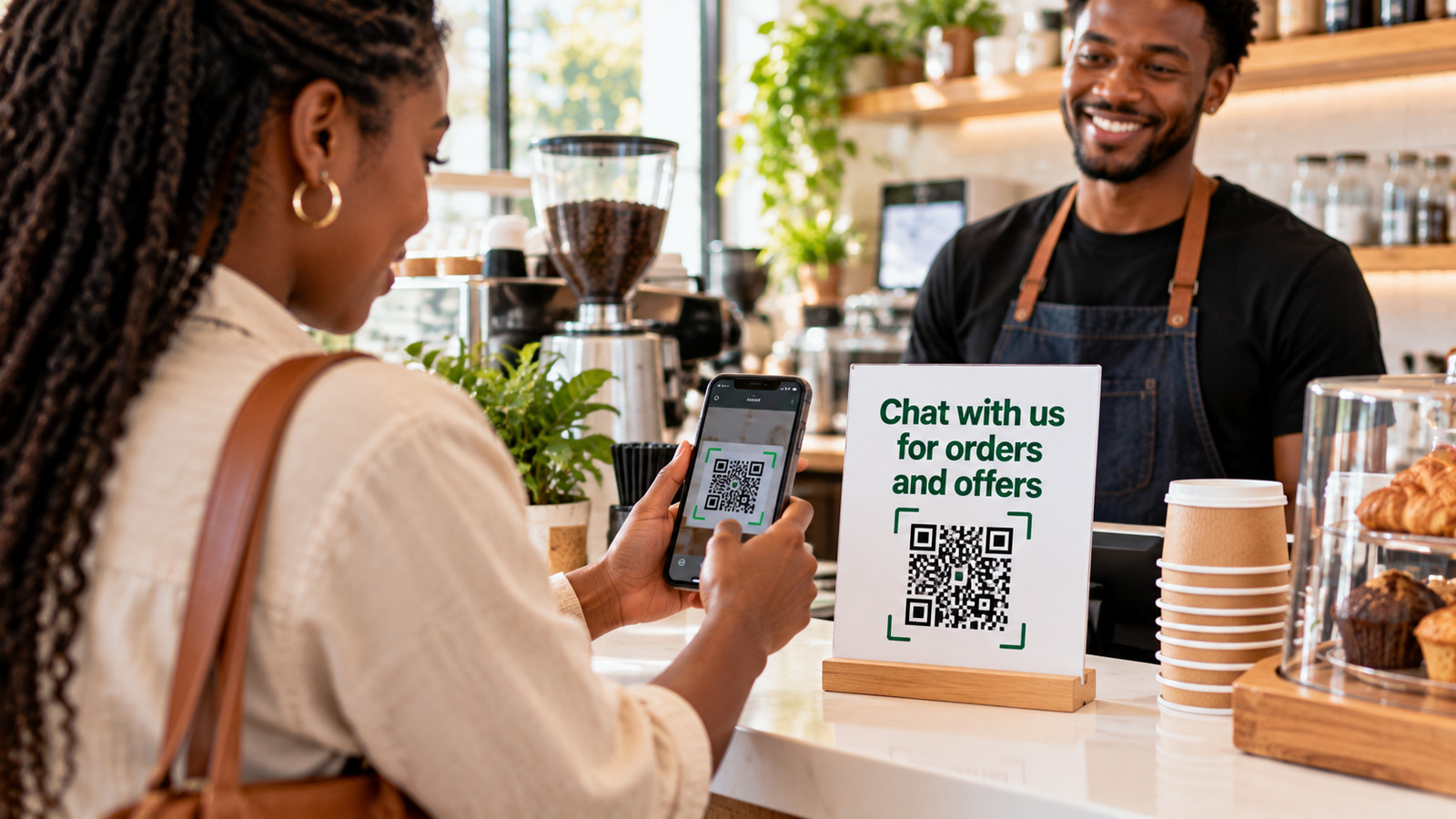
Google Business Profile is where many local customers find you first, and our guide on how to put your business on Google Maps shows you how to set it up.
Free WhatsApp Link Generator
Create a click-to-chat link with a ready-made message and a source code, so you know whether each chat came from Instagram, a flyer or an ad.
How To Sell On WhatsApp Business: The 10-Step Sales Conversation
Most guides skip this part.
Here’s exactly how to sell on WhatsApp Business, from the first “Hi” to the reorder.
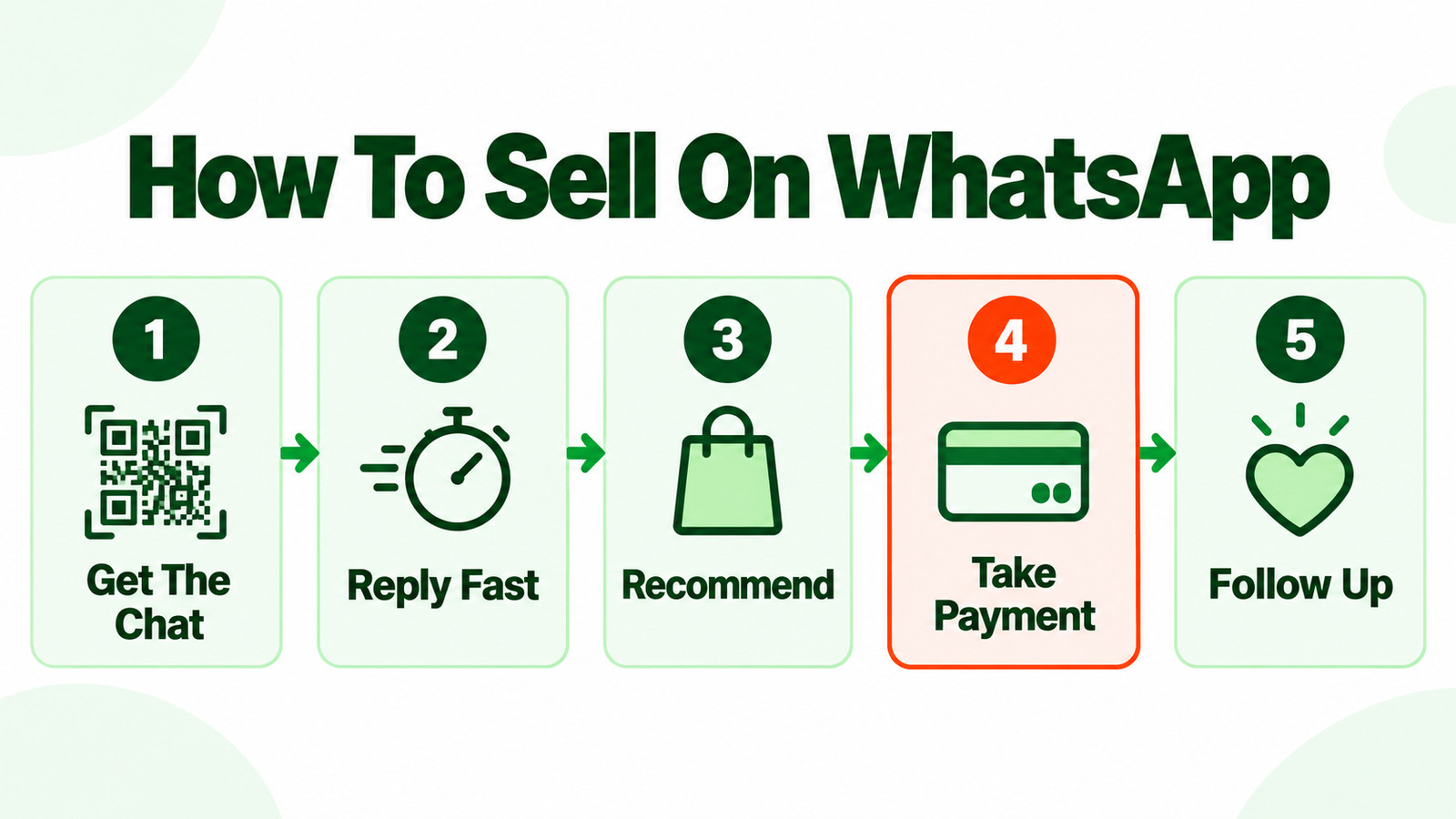
Your greeting message replies instantly. Then a real person follows up within minutes, not hours.
What is it for? When do you need it? What size, budget or city? You can’t recommend well until you know.
Send each with a one-line reason. For pricier items, add a short video or voice note.
Price, trust, delivery time, “let me think.” Use the scripts below.
One clear question: “Shall I reserve the black one in size 10 for you?”
Items, price, delivery fee, total, address and delivery date, in one clean message.
Send a payment link or your official account details as text. Confirm the moment it lands.
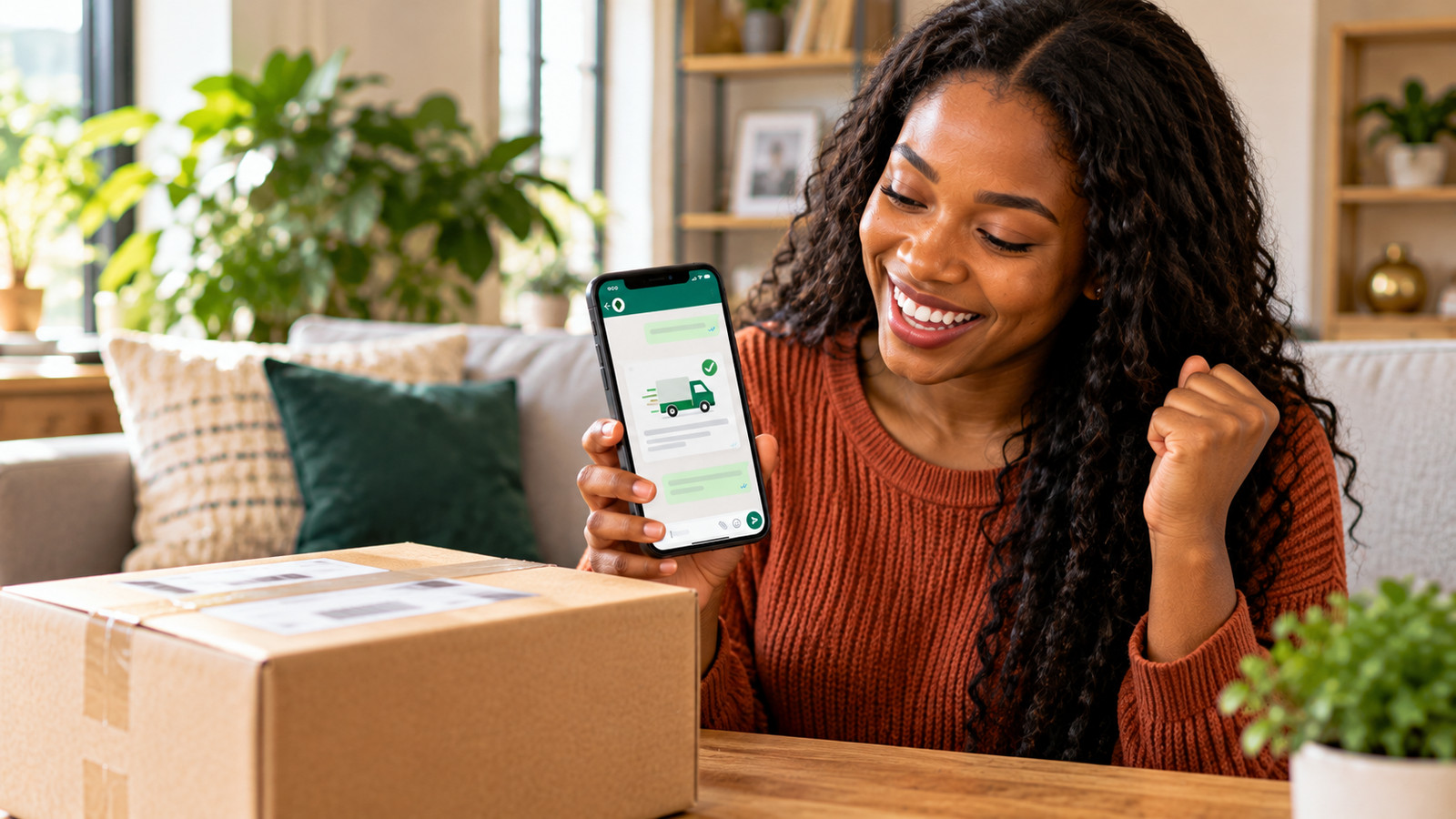
Dispatched, out for delivery, delivered. Updates cut “where is my order?” messages and build trust.
Two to five days after delivery, with a direct link to your Google review page.
Time a reorder reminder to how long the product lasts, such as day 25 for a 30-day supply.
Here’s what steps 2 to 7 look like in an example chat:
Word-for-word sales script
Hi [Name], thanks for reaching out. I’m [your name] from [Business Name].
Quick question so I can find the right one for you: is this for [use A] or [use B]? And when do you need it?
Based on that, my top 2 picks are [item 1] for [reason] at [price], and [item 2] for [reason] at [price].
Most customers in your situation choose [item 1]. Shall I reserve it for you? I just need your delivery address and how you’d like to pay.
How to answer the 3 most common objections
I understand. [Item] costs a bit more because [key reason: material, warranty, results]. Most customers find it lasts [X], so it works out cheaper over time.
If you’d prefer a lower budget, [alternative item] at [price] is a great option. Which would you like?
Of course, take your time. Is there anything I can clear up, like size, delivery or payment?
Just so you know, we have [X left / the offer ends on date]. I can hold it for you until [time], with no obligation.
Fair question, and we’re glad you asked. We’ve been in business since [year] and served [number] customers. Here are recent reviews: [link].
Our address is [address], and we only accept payment to [account named on our profile].
Add “We only accept payment to the accounts listed on our profile” to your greeting message. Fake-seller scams are common in chat selling, and this one line reassures buyers and protects your name.
How To Take Payment On WhatsApp, Country By Country
Payment is the step most guides on how to sell on WhatsApp Business leave out.
In a few countries, customers can pay inside WhatsApp.
Everywhere else, you send a payment link or your account details in the chat.
| Market | How sellers usually get paid |
|---|---|
| India | In-chat payments to businesses with UPI apps, cards and net banking, plus UPI links and QR codes |
| Brazil | In-chat card payments for small businesses, and Pix codes generated for each order |
| Singapore | In-chat card and PayNow payments, reported in 2023 for some Platform businesses, where available |
| Nigeria and Ghana | Payment links from Paystack or Flutterwave, or bank transfer to an account in the business name |
| Kenya | An M-Pesa Buy Goods till number shared in the chat |
| US, UK and most other markets | Payment links from Stripe, Square or PayPal, with no website needed |
In-chat payment features change often, so check what’s live in your country.
And remember, under the WhatsApp Business Policy, you’re responsible for your own sales, payments and deliveries.
Status, Channels, Broadcasts And Groups: Which To Use
WhatsApp gives you five main ways to reach people beyond a single chat, and smart WhatsApp marketing uses each one for a different job.
Remember this one line:
1:1 chats sell. Status reminds. Channels reach. Broadcast lists bring people back. Groups and communities build belonging.
| Feature | How it works | Best for | Watch out for |
|---|---|---|---|
| Status | Photos, videos and text that disappear after 24 hours. Viewers can reply to start a chat | Daily products, offers, proof and behind the scenes | Mostly seen by people who saved your number |
| Channels | One-way updates to followers, who can react and vote in polls but not reply | Reaching a big audience with drops, tips and news | Add a chat link so followers can buy |
| Broadcast lists (app) | One message sent to many contacts. Replies arrive as private chats | Restocks, offers and reorder reminders to past buyers | Only reaches contacts who saved your number, up to 256 per list |
| Groups | Shared chats where members can see and message each other | VIP clubs, resellers, classes and events | Members see each other’s numbers. Never add people without asking |
| Communities | Several related groups under one umbrella, with an announcement group | Schools, academies, membership clubs and reseller networks | Needs active moderation |
There’s also a newer option on the app.
Business Broadcasts send private messages to many customers at once, even if they haven’t saved your number, with scheduling, buttons and insights.
They’re available to eligible businesses in select countries.
How to sell with WhatsApp Status
Status is the most underused sales tool on WhatsApp.
It’s free, it’s seen by your warmest contacts, and every view is a chance to start a chat.
- Post three to six times a day, spread across the day.
- Mix four things: product, proof, people and price.
- End every post with an action: “Reply 1 to reserve” or “Reply BLUE for the blue one.”
- Run Status-only flash prices to reward people who watch.
- Keep videos short, around 15 to 30 seconds.
- Check who viewed your Status, and gently follow up with past customers who looked at a product.
Your 14-day Status calendar
| Day | Post this | Day | Post this |
|---|---|---|---|
| 1 | New arrival with price and “Reply 1 to reserve” | 8 | Restock announcement with units left |
| 2 | Customer review or video testimonial (with permission) | 9 | Before and after, or an unboxing |
| 3 | Behind the scenes: packing or making orders | 10 | FAQ answer: delivery, payment or returns |
| 4 | “This or that?” poll: reply A or B | 11 | Bundle offer: buy A and B, save [amount] |
| 5 | Status-only flash price until midnight | 12 | Delivery proof: “Delivered to [city] today” |
| 6 | 15-second how-to or styling tip | 13 | Customer photo with your product |
| 7 | Your face: a short story about why you started | 14 | Weekly recap and next week’s teaser |
How to use broadcast lists without getting blocked
On the app, each broadcast list holds up to 256 contacts, and the app is clear about the rule:
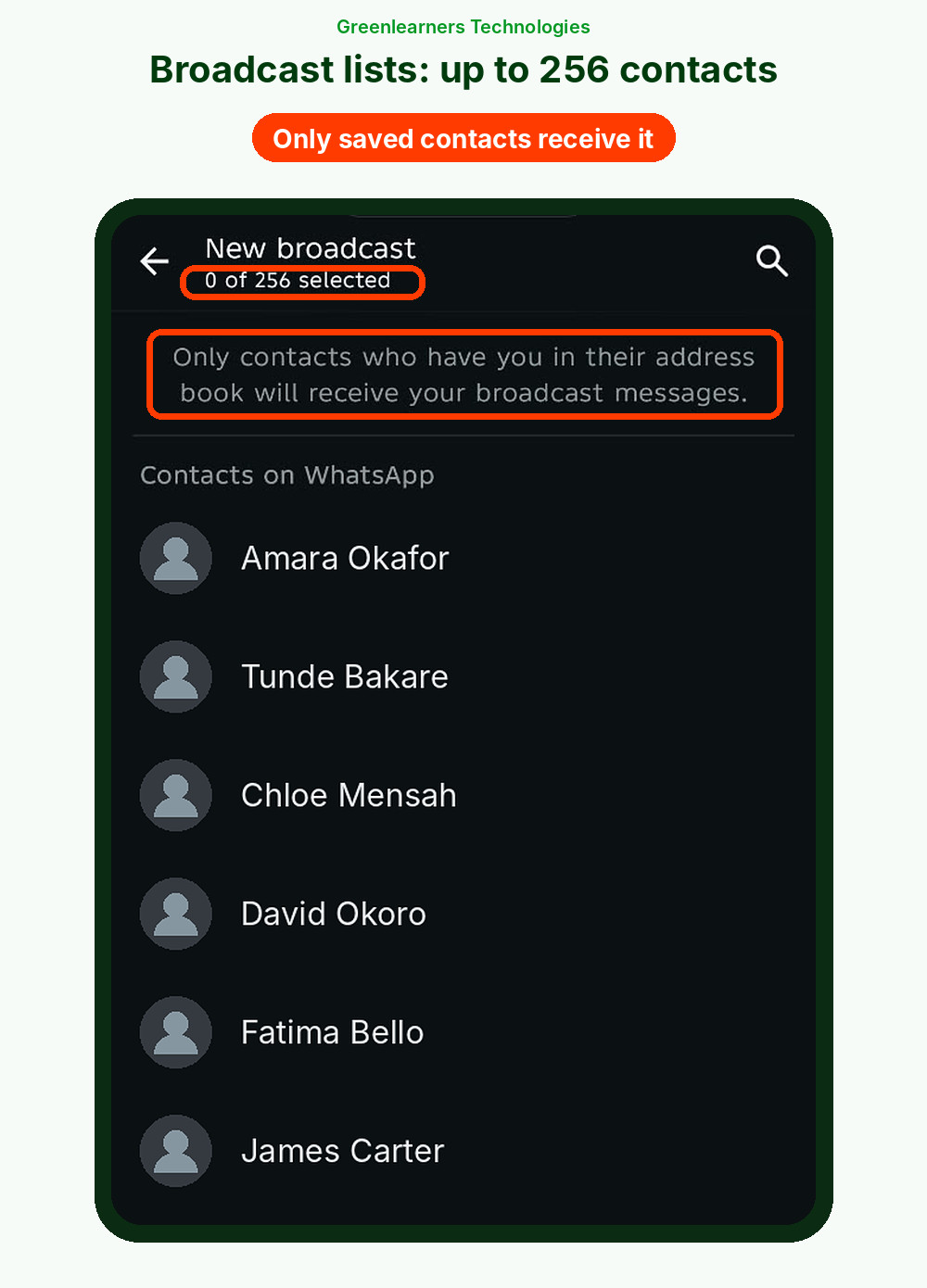
- Ask customers to save your number, because classic broadcast lists only reach contacts who did.
- Split lists by interest or past purchase, such as “Men’s shoes” or “Bought in the last 90 days.”
- Send one or two marketing messages a week at most.
- Remove people who ignore three campaigns in a row.
Need to reach thousands of customers at once?
Compare the best WhatsApp bulk message senders that run on Meta’s official platform, with real prices and a free cost calculator.
How To Use WhatsApp Communities To Get Leads And Sell
Communities are one of WhatsApp’s most underrated selling tools.
They let you gather customers, fans and leads in one place, for free.
A WhatsApp Community connects related groups under one umbrella, with an announcement group that reaches everyone at once.
One key difference: an announcement is a group post that members see together, not a private message.
So use Communities for belonging and launches, and private chats or bulk messages for personal offers.
How to set up a Community for your business
- Open the Communities tab in WhatsApp Business and tap New community.
- Add a clear name, a photo and a short description of what members get.
- Add groups by interest, such as “New arrivals,” “Deals” or “Tips and tutorials.”
- Turn on join requests for your groups, so you approve who gets in.
- Post a welcome announcement with your rules, your catalog link and how to order.
- Share the invite link with customers and leads who ask to join.
6 ways to use Communities to get leads and sell
Every play ends the same way: move interested members into a private chat to close the sale.
Community rules that protect your number
- Only add people who asked to join, and respect anyone who leaves.
- Don’t @mention members in announcements, because it shows their number to everyone.
- Remember that admins and people in the same group can see each other’s numbers.
- Keep announcements useful: one or two a week, plus your events.
- Never use unofficial tools to post automatically or add members.
12 Effective WhatsApp Marketing Strategies For Businesses
Once your setup works, these WhatsApp marketing strategies turn it into a steady sales channel.
Start with two or three, not all twelve.
1Run Click-To-WhatsApp Ads
Instead of sending ad clicks to a website, send them straight into a chat.
People ask questions, you answer, and you sell in the same place.
Meta’s guide for small businesses says to finish your profile, switch on greeting and away messages first, use real product photos and reply fast.
Use a pre-filled message per ad, such as “Hi, I’m interested in (AD-OCT).” You’ll know exactly which ad brought each chat. Our Meta ads services run these campaigns for you.
2Sell Daily On Status
Treat Status like a free TV channel for your best customers.
Follow the 14-day Status calendar above, and end every post with a reply keyword.
3Lead With Your Catalog
It’s the simplest way to sell on WhatsApp Business. Share catalog items in chats, on Status and in broadcasts.
A product card with a photo and a price closes faster than a paragraph of text.
4Send Segmented Broadcasts, Not Blasts
“New sneakers in size 10” sent to men who bought sneakers beats “Big sale!” sent to everyone.
Segmenting keeps messages relevant, and relevant messages get fewer blocks.
5Recover Abandoned Carts
If you sell online and use the WhatsApp Business Platform, send a cart reminder to customers who opted in.
A simple sequence works well:
- After 1 hour: a friendly reminder with the product photo.
- After 24 hours: a review or social proof.
- After 72 hours: a small incentive, such as free delivery.
6Time Your Reorder Reminders
If a product lasts 30 days, message on day 25: “Running low? Reply REPEAT and we’ll send the same order.”
It’s the easiest sale you’ll ever make.
7Build A VIP Group Or Early-Access List
Give your best customers first access to new drops, with posting set to admins only.
Exclusivity makes people want in, and members become your loudest fans.
Run it as a WhatsApp Community, so one announcement reaches every member.
8Grow A Channel For Reach
Channels let you reach people who haven’t chatted with you yet.
Post drops, tips and behind-the-scenes content, and add a chat link to every post so followers can buy.
9Automate Replies, Keep Humans For Selling
Let greeting messages, quick replies, chatbots or an AI agent handle the common questions any time of day.
Keep complaints, large orders and sensitive chats with a real person.
10Turn Happy Customers Into Referrals
WhatsApp is built for sharing.
After a great experience, send a message your customer can forward: “Know someone who’d love this? Forward this message and you both get [reward].”
11Collect Reviews And Customer Photos
Ask for a review a few days after delivery, and ask permission to share customer photos on Status.
Real proof sells better than anything you can write.
12Connect Every Discovery Channel To WhatsApp
Neil Patel’s team estimates Google handles about 13.7 billion searches a day.
Patel argues that’s only around a quarter of all the searching people do every day across Instagram, YouTube, Amazon, TikTok and AI tools like ChatGPT.
Estimates vary, but the shift is real: your next customer may discover you anywhere, not just on Google.
So put your WhatsApp link everywhere people find you: Google Maps, Instagram, YouTube, TikTok, your website and the pages AI tools draw on.
Every channel should end in the same place, a conversation.
Our social media marketing, local SEO and AI SEO services help customers find you, and WhatsApp turns that attention into sales.
WhatsApp Marketing Templates You Can Copy
These WhatsApp marketing templates are ready to use.
Copy them, change the words in [brackets], and save them as greeting, away and quick-reply messages.
Keep emojis light: two or fewer per message.
Hi, thanks for messaging [Business Name] 👋 We sell [what you sell] and deliver to [areas].
See our catalog here: [link]. Tell us what you need and we’ll reply within [time]. We only accept payment to the accounts listed on our profile.
Thanks for your message! We’re closed right now and back at [time, day].
Meanwhile, browse our catalog: [link]. Or reply with the item name and your city, and we’ll send the price first thing.
8 quick replies every seller needs
| Shortcut | Message |
|---|---|
| /price | The [item] is [price]. It comes in [options]. Would you like me to reserve one for you? |
| /delivery | We deliver to [areas] in [X to Y days]. Delivery is [fee], free on orders over [amount]. Which city should we deliver to? |
| /payment | You can pay by [payment link / transfer / card]. We only accept payment to the accounts on our profile. Once paid, we’ll confirm right away. |
| /location | We’re at [address]. Map: [link]. Open [days and hours]. |
| /hours | We’re open [days], [hours]. Messages after hours are answered by [time] the next day. |
| /catalog | Here’s our full catalog: [link]. Send me any item and I’ll check stock for you. |
| /status | Thanks for waiting! Order [#number] is [status]. Expected delivery: [date]. Tracking: [link]. |
| /thanks | Thank you for shopping with [Business Name] 🙏 If you need anything at all, just message us here. |
6 marketing messages for opted-in customers, plus an opt-in confirmation
Send these only to people who agreed to hear from you.
On the WhatsApp Business Platform, they must be approved by Meta as marketing templates first.
Hi [Name], new in at [Business Name]: , [one-line benefit]. Only [quantity] in this first batch. Reply SHOW ME for more photos, or view it here: [link]
Reply STOP to opt out.
Good news, [Name] 🎉 [Product] is back in stock. It sold out in [X days] last time. Want me to reserve yours? Reply YES with your size.
Reply STOP to opt out.
[Name], for the next 48 hours only, get [offer] on . Use code [CODE] or reply OFFER and we’ll sort it for you. Ends [day, time].
Reply STOP to opt out.
Hi [Name], you left in your cart. It’s still available, but stock is low. Finish your order here: [link]. Questions about size or delivery? Just reply.
Reply STOP to opt out.
Hi [Name], it’s been about [X weeks] since your last . Running low? Reply REPEAT and we’ll send the same order to your saved address.
Reply STOP to opt out.
Hi [Name], we hope you’re enjoying your . Could you spare 30 seconds for a review? It really helps a small business like ours: [link]. Thank you!
Reply STOP to opt out.
Thanks, [Name], you’re in ✅ You’ll get [order updates, restock alerts and up to 2 offers a week] from [Business Name] on WhatsApp.
Save this number so you never miss a drop. Reply STOP anytime to unsubscribe.
Free WhatsApp Message Checker
Paste any broadcast or marketing message before you send it.
The checker scores it on the seven things that decide whether people reply or block you.
WhatsApp Automation And AI Agents: Sell While You Sleep
You can’t reply at 2 a.m. An automated reply or an AI agent can.
Automation is how to sell on WhatsApp Business without living on your phone.
AI is already doing real work. Meta says more than one million businesses use its Business Agent.
GummiTiles, a team of six in Mexico, reported that the agent handled 80% of its conversations.
The rule: automate the repeatable, keep humans for the important. Let AI answer prices and opening hours.
Keep complaints, big orders and sensitive questions with a person.

Our marketing automation services set this up for you, with the right human handoffs built in.
WhatsApp Business Platform Pricing, Explained Simply
The free app costs nothing to message your customers.
The Platform is different, and its pricing confuses almost everyone. Here’s the plain-English version.
- You pay per message. Since July 1, 2025, Meta charges per delivered message, not per conversation.
- Replies now cost money too. Since October 1, 2026, Meta charges for service messages, the replies you send inside the 24-hour customer service window, at the utility rate with no volume discounts.
- Ask about free replies. Some providers report a free monthly allowance per number.
- Ad clicks still give you 72 free hours. If someone messages you from a click-to-WhatsApp ad or your Facebook Page button and you reply within 24 hours, messages in that 72-hour window stay free.
- Marketing templates cost money, and the price depends on the customer’s country. Check Meta’s current rate card before you budget.
- Templates need approval. Meta reviews each one, which can take up to 24 hours.
- New accounts start small. A new business can message 250 people a day outside the service window at first, then 2,000 or more as quality and volume prove themselves.
Meta says WhatsApp does not currently deliver marketing templates to US phone numbers. Service replies and utility messages still work. For US customers, focus on one-to-one chats, ads that open a chat, and order updates.
In many countries, Meta also limits how many marketing messages a person receives, based on how much they’ve engaged recently.
Relevant messages get through. Spam doesn’t.
How To Avoid Getting Your WhatsApp Number Banned
One mistake can cost you a number and every customer chat on it.
WhatsApp’s Business Messaging Policy says it may limit or remove your access, and even ban your organization from future use.
These are the things that get businesses restricted:
Use only official apps. Get and record opt-in. Add “Reply STOP to opt out” to marketing messages. Send at most one or two promotions a week. Segment so every message is relevant. Never share one customer’s details with another. Watch your block rate every week.
How To Measure Your WhatsApp Marketing
Chats feel busy, but busy isn’t the same as profitable. Track these WhatsApp marketing numbers every week.
| Metric | How to work it out | Why it matters |
|---|---|---|
| First reply time | Minutes from a new message to your first real reply | Speed often decides who gets the sale |
| New conversations | New chats per week, by source | Shows which channels bring buyers |
| Chat-to-order rate | Orders ÷ new conversations | Your core selling skill |
| Revenue per conversation | WhatsApp sales ÷ conversations | Tells you what a chat is worth |
| Cost per conversation | Ad spend ÷ chats started from ads | Compare it with revenue per conversation |
| Block and opt-out rate | Blocks or STOP replies ÷ people messaged | Warns you before your number gets restricted |
| Repeat purchase rate | Customers with 2+ orders ÷ all customers | Shows WhatsApp’s real long-term value |
How to track which channel each chat came from
Chats don’t carry tracking tags the way website visits do. So use these four tricks:
- Add a source code to every pre-filled message, like “(IG-BIO)” or “(FLYER-OCT)”. The link generator does this for you.
- Send link clicks through a page on your own website first, with UTM tags, so Google Analytics counts them. Google’s Campaign URL Builder makes the tags.
- Use a different discount code for each channel, so every sale shows its source.
- Log every order in a simple sheet or CRM: date, source, value and paid or not.
Our analytics and tracking services can connect all of this for you.
WhatsApp Marketing Playbooks For 12 Industries
Every industry uses WhatsApp marketing a little differently. Here’s how to sell on WhatsApp Business in yours.
Play: a “Friday Drop.” Post five new pieces on Status on Thursday night with “Reply with the number to reserve,” hold reservations for two hours, then broadcast to past buyers on Friday morning. Avoid: sending your whole catalog before you know their size and occasion.
Play: a WhatsApp opt-in box at checkout, then order updates, cart reminders and back-in-stock alerts. Avoid: adding every past buyer to promotions without WhatsApp consent.
Play: today’s specials on Status at 10:30 a.m. and 4:30 p.m., a menu quick reply, and “Reply REPEAT for your last order.” Avoid: slow replies at peak time. Use an auto reply with the menu and wait time.
Play: one click-to-WhatsApp ad per listing with the property code in the message, a 60-second video tour, and two viewing slots. Avoid: sending every listing to every lead. Match on budget and area.
Play: booking confirmations, a reminder 24 hours before with “Reply 1 to confirm, 2 to reschedule,” and a rebooking nudge at the usual interval. Avoid: sharing health details anywhere but a private chat.
Play: a free lesson via a click-to-chat link, a three-message follow-up (value, testimonial, deadline), then a community for each class. Avoid: big open groups where leads see each other’s numbers.
Play: send the itinerary and check-in details 48 hours before arrival, then offer airport pickup, late checkout or tours. Avoid: leaving guests with no human backup when they’re stuck at night.
Play: a weekly price list and stock update to segmented buyers, with a simple order format: “Reply with item code and quantity.” Avoid: one giant reseller group where price fights happen in public.
Play: “Get today’s price on [model]” ads, a walkaround video, finance estimate and test-drive slots. Avoid: leading with price alone before you’ve built interest.
Play: QR codes on posters for early-bird access, reminders 7 days and 1 day before, and a channel for live updates on the day. Avoid: promoting unrelated events to ticket buyers without consent.
Play: intake questions and booking by chat, deadline reminders, and a secure upload link for documents. Avoid: giving formal advice in casual chat. Keep WhatsApp for logistics.
Play: opt-in at signup, a day-one setup tip, a day-three “Reply HELP” message, and a trial-ending reminder with a short demo. Avoid: copying every email onto WhatsApp.
Selling in a specific market?
See our e-commerce, real estate, healthcare, hospitality and education marketing services.
WhatsApp Marketing Rules By Country
WhatsApp’s own policy applies everywhere: get opt-in, honor opt-outs, and don’t spam or mislead.
On top of that, local laws apply where your customers live.
This is general information, not legal advice. Laws change, so check with a lawyer in the countries where you sell.
10 WhatsApp Marketing Mistakes That Cost Sales
Your 30-Day WhatsApp Launch Plan
Here’s how to put WhatsApp marketing to work in the next 30 days.
Want to see where WhatsApp fits in your wider plan? Read our guides on how to get leads and 17 marketing strategies.
Want us to set up and run your WhatsApp marketing?
You can follow this guide and do it yourself. If you’d rather have it done for you, our WhatsApp marketing services cover the full job.
We set up your WhatsApp Business profile and catalog, write your greeting, quick replies and sales scripts, run click-to-WhatsApp ads, and connect automation and tracking, for businesses in Africa, the UK, the US, Canada and beyond.
- WhatsApp Business app or Platform, set up right
- Sales scripts, templates and automation
- Ads, broadcasts and weekly sales numbers
Start with a free WhatsApp review: send your business name, country and website on WhatsApp. We’ll show you the quickest wins first. No obligation, and no honest agency can promise an exact number of sales.
Questions About WhatsApp Marketing
WhatsApp marketing is using WhatsApp to attract customers, answer questions, sell and keep customers coming back, through one-to-one chats, Status, Channels and messages people have agreed to receive.
It works because more than 3 billion people already use WhatsApp, and a chat feels personal, which builds trust fast.
Set up a complete business profile and catalog, switch on greeting and away messages, and share your WhatsApp link everywhere customers find you.
Then reply within minutes, ask one to three questions, recommend two or three products, send a clear order summary and payment link, and follow up with delivery updates and reorder reminders.
Yes. The WhatsApp Business app is free to download and use, with optional paid extras such as Meta One in some countries.
The WhatsApp Business Platform (API) charges per delivered message. Since October 1, 2026, that includes replies inside the 24-hour service window, although chats started from click-to-WhatsApp ads stay free for 72 hours.
The app is for small businesses replying personally on a phone and linked devices. The WhatsApp Business Platform, often called the API, is for businesses that need a team inbox, automation, store links or messages to thousands of opted-in customers.
With Coexistence, you can use the app and the Platform on the same number, with some limits.
Share a click-to-chat link in your bio, website, emails and Google Business Profile, print QR codes, run click-to-WhatsApp ads, and add a WhatsApp opt-in box at checkout.
Give people a reason to message you, such as a price list, a size guide or a first-order discount.
Only to people who opted in. On the app, broadcast lists send one message to up to 256 contacts who saved your number, and Business Broadcasts are available in select countries.
On the Platform, you send approved marketing templates. Unofficial bulk-sending tools break WhatsApp’s rules and can get your number banned.
Since July 1, 2025, Meta charges per delivered message, with prices that depend on the customer’s country and the message category: marketing, utility or authentication. Since October 1, 2026, service replies inside the 24-hour window are charged too, at the utility rate.
Messages stay free for 72 hours when a customer starts a chat from a click-to-WhatsApp ad and you reply within 24 hours. Your provider may add its own fee.
In some markets, such as India, Brazil and Singapore, some businesses can take payment inside WhatsApp, so check what is live where you sell. Everywhere else, send a payment link from Stripe, Square, PayPal, Paystack or Flutterwave, or your official account details, as text in the chat.
Confirm payment quickly, and tell customers you only accept payment to the accounts listed on your profile.
Use only the official WhatsApp Business app or Platform, never modded apps like GB WhatsApp. Only message people who opted in, honor every opt-out, and avoid bulk-sending tools.
Keep marketing relevant and limited to one or two messages a week, and watch your block rate.
We could not find any study behind it. The sources that quote it point to each other in a circle.
Real case studies still show strong engagement. Reen Naturals in India reported read rates of 75.8% on broadcasts and 83.8% on automated journeys.
Meta says WhatsApp does not currently deliver Platform marketing templates to US phone numbers. One-to-one chats, service replies, utility messages and ads that open a chat still work.
For US customers, focus on fast replies, click-to-WhatsApp ads and helpful order updates.
For most businesses, one or two marketing messages a week to opted-in customers is plenty. Status can be posted daily, because people choose to watch it.
Segment your lists so every message is relevant, and remove people who ignore three campaigns in a row.
Yes, when you follow WhatsApp’s policy and local law. That means getting opt-in, honoring opt-outs, and following rules such as the GDPR in Europe, PECR in the UK, the LGPD in Brazil and the Data Protection Act in Nigeria.
The rules differ by country, so check with a lawyer where you sell.
Yes. Status updates last 24 hours, and viewers can reply to start a chat. Post three to six times a day, mix products, proof, people and prices, and end each post with a reply keyword like “Reply 1 to reserve.”
Ask customers to save your number so they see your Status.
Start with a complete profile and catalog, daily Status posts, fast replies with quick replies, and a click-to-chat link everywhere customers find you.
Then add segmented broadcasts, reorder reminders, click-to-WhatsApp ads and referral messages.
Create a Community from the Communities tab, add groups by interest, and use the announcement group to share launches, tips, events and members-only offers with everyone at once.
Only add people who asked to join, keep announcements useful, and move interested members into a private chat to close the sale.
Yes. Our WhatsApp marketing services cover setup, catalog, greeting and quick replies, sales scripts, automation, click-to-WhatsApp ads, broadcasts and tracking.
Message us on WhatsApp for a free review. Whoever you hire, make sure your business owns the number and the account.
Disclaimer
Greenlearners Technologies is not affiliated with WhatsApp or Meta. WhatsApp is a trademark of WhatsApp LLC. The chat screens in this guide are illustrations we designed for teaching, using example businesses.
Features, prices, limits and policies in this WhatsApp marketing guide were checked on October 16, 2026. Meta changes them often, and some features are only available in certain countries.
The rules section is general information, not legal advice. Speak to a qualified lawyer in the countries where you sell.
How we researched this guide: every statistic was checked against its source. Case study results are self-reported by the businesses, as Meta notes. Tips without a linked source come from our own client work.
- WhatsApp. About WhatsApp. whatsapp.com
- WhatsApp Business (2026). Introducing Meta Business Agent. whatsappbusiness.com
- WhatsApp Business. Business app features. whatsappbusiness.com
- WhatsApp Business. WhatsApp Business Messaging Policy and Commerce Policy. whatsappbusiness.com
- WhatsApp Business. Platform pricing. whatsappbusiness.com
- Meta for Developers. WhatsApp Business Platform pricing. developers.facebook.com
- Meta for Developers. Non-template (service) message pricing. developers.facebook.com
- Meta for Developers. Messaging limits. developers.facebook.com
- Meta for Developers. Per-user marketing template limits. developers.facebook.com
- Meta for Developers. Onboarding WhatsApp Business app users (Coexistence). developers.facebook.com
- DataReportal (2025). Digital 2026 Global Overview Report. datareportal.com
- DataReportal (2025). Digital 2025 July Global Statshot. datareportal.com
- Pew Research Center (2025). Americans’ Social Media Use 2025. pewresearch.org
- NP Digital (2025). Daily searches by platform. neilpatel.com
- WhatsApp Business. Success stories: Art di Cacao, Reen Naturals, GummiTiles, TriHealth, Donna Capilli. whatsappbusiness.com
- Information Commissioner’s Office. Guidance on direct marketing using electronic mail. ico.org.uk
- General Data Protection Regulation. Article 21: Right to object. gdpr-info.eu
- Presidency of Brazil. Lei 13.709 (LGPD). planalto.gov.br
- Olaniwun Ajayi LP (2026). Court orders GTCO to cease unsolicited marketing. oal.law
- Orrick (2026). Seventh Circuit holds texts are not telephone calls under the TCPA. orrick.com
- Stripe. Payment links. stripe.com
- Paystack. Payment pages for entrepreneurs. paystack.com
- Safaricom. M-Pesa Buy Goods. safaricom.co.ke