

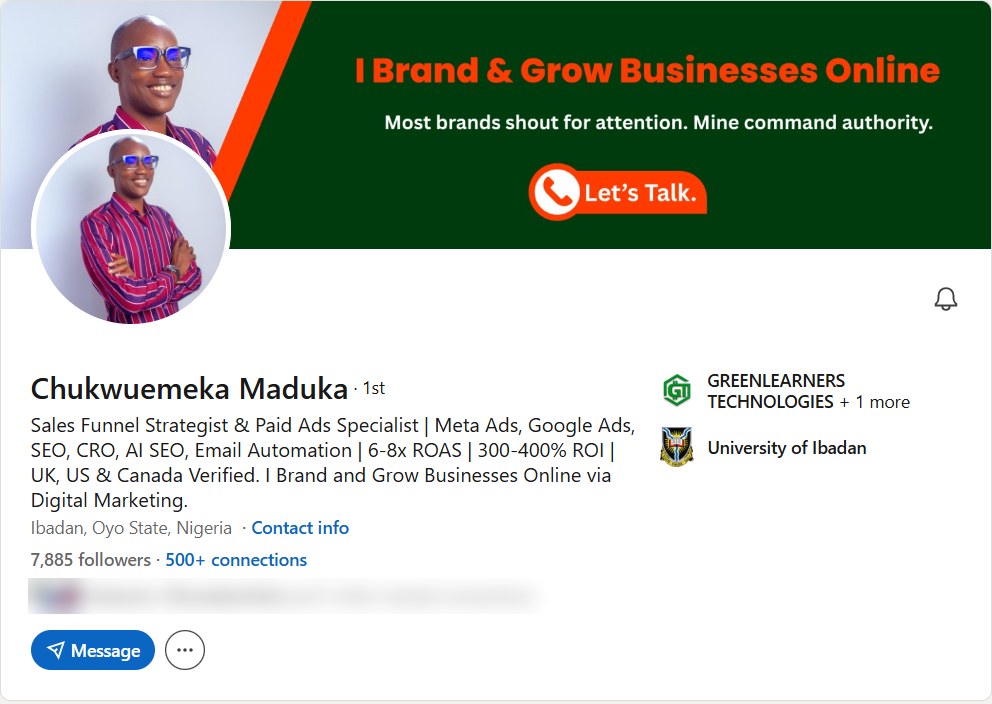
This morning, November 11, 2026, I opened my LinkedIn profile and it said 7,885 followers.
I haven’t done much to earn them.
A few posts a month, a well-optimized profile, connecting with the right people and leaving a comment here and there.
And yet, several of my clients found me on LinkedIn, including businesses in the UK, the US and Canada that had never heard of Ibadan, Nigeria, before we spoke.
So I asked myself a question that I think you’ve asked too.
If LinkedIn works this well when I’m barely trying, what happens when I actually try?
I’m going to find out, in public, and you get to watch.
In the first quarter of 2027, I’ll start a 30-day experiment to add 12,723 followers to this profile, about 424 a day, and I’ll document all of it on my LinkedIn profile and right here on this page.
It’s one step toward a bigger goal my team and I are preparing for: 100,000 followers on LinkedIn, and on every other channel we run, before the end of 2027.
Now, before you think this is another “post daily and you’ll blow up” article, let me tell you what I found.
I studied 27 videos on how to increase followers on LinkedIn before writing a single line of this guide.
Most of them repeat each other.
Two of them, by Tobi Oluwole and Matt Gray, actually show their numbers, and I’ve broken both down for you below with clickable timestamps.
I also read what LinkedIn itself published about its new feed in March 2026, and one independent study of 1.8 million posts that found follower growth fell about 59% in a year for the accounts it tracked.
So if your follower count barely moves, you’re not imagining it.
Maybe you’re the accountant in Lagos who posted every day in January and stopped in February because nothing happened.
Or the founder in Manchester who paid someone to “grow” the company page and got 400 followers from countries you don’t sell to.
Or the freelancer in Nairobi with 3,000 connections and not one client who found you on LinkedIn.
I’ve met all three, and I’ve been a quieter version of each of them.
THE OLD TRICKS STOPPED WORKING. THE PEOPLE WHO UNDERSTAND THE NEW RULES ARE STILL GROWING FAST.
In this guide, I’ll show you exactly how to increase followers on LinkedIn with the same 30-day plan I’m running for my 12,723 experiment.
You’ll learn how to set up your profile so visitors follow you, how to increase followers on a LinkedIn company page, when paying makes sense, how I win clients abroad from Nigeria and how to turn followers into customers.
Plus 4 free tools, starting with a planner that shows what your own numbers can bring in 30 days, and a LinkedIn marketing plan that works whether you’re a freelancer in Lagos or a B2B founder in Texas.
How to increase followers on LinkedIn: make Follow your main profile button, write a headline that says who you help and the result they get, then post about 2 or 3 topics your profile promises, on a rhythm you can keep.
Then go where your future followers already are: leave thoughtful comments on bigger accounts in your niche, reply to every comment on your posts, launch a newsletter, and tell stories instead of listing facts.
For a company page: complete every section, use your monthly invite credits, get your team to post and share, publish at least weekly and let the founder’s profile feed the page.
And measure the right thing: not how many people followed you, but how many of them are the people you want to work with.
Published November 11, 2026 · The 30-day plan behind my 12,723-follower experiment, 2 creator breakdowns with timestamps, the 2026 feed changes and 4 free tools · By Chukwuemeka Maduka
- My 12,723 LinkedIn followers in 30 days experiment
- Three LinkedIn success stories that keep me showing up
- Why getting followers on LinkedIn got harder in 2026
- Personal profile or company page: which to grow
- The math behind 424 followers a day
- Free 30-day LinkedIn follower planner
- How to increase followers on LinkedIn in 30 days
- Starting from zero: set up your LinkedIn account
- Set up your profile so people follow
- Free LinkedIn profile follow audit
- Tobi Oluwole: 1,000 to 400,000 followers
- What to post to gain followers on LinkedIn
- Free LinkedIn story and post builder
- Matt Gray: 846,000 followers in 36 months
- Turn comments into profile visits and followers
- Launch a LinkedIn newsletter
- How to get more likes on LinkedIn
- How to increase followers on a LinkedIn company page
- How to increase followers on LinkedIn with paid ads
- LinkedIn Premium, Sales Navigator and Recruiter: what to pay for
- How I grow LinkedIn followers abroad from Nigeria
- Mistakes that kill your growth
- Turn LinkedIn followers into customers
- Free LinkedIn follower quality check
- Questions people ask
Watch me do it before you try it
I am running these growth experiments in public on my personal accounts, cross-posting to the Greenlearners Technologies pages, and documenting every step: what I tried, what worked and what flopped. Follow along and copy what works.
- 12,723LinkedIn followers in 30 daysMy 12,723 LinkedIn Followers In 30 Days Experiment. First quarter of 2027, starting from 7,885
- 100,000followers on every channelLinkedIn, X, YouTube, Facebook, Instagram and my WhatsApp communities, by December 2027
- 100,000visits a monthTo greenlearnerstechnologies.com and to our Pinterest, by December 2027
- 100,000email subscribersOn our own list, by December 2027
My 12,723 LinkedIn Followers In 30 Days Experiment
I picked the number on purpose.
10,000 sounds like a guess.
12,723 is a target I have to hit exactly, and anyone with a browser can check whether I did.
Will I hit it?
I don’t know yet, and I won’t pretend I do.
I won’t only show you the posts that performed well.
I’ll show you the ones that got 11 likes, the week I ran out of ideas, and the changes I had to make.
A useful experiment should teach you something even when the result falls short of the target.
12,723 in a month is not a benchmark for a beginner. A new graduate might want 500 relevant followers. A freelancer might want 1,000 potential clients. A consultant might want 5,000 people in one niche. Use the planner to set a goal that fits your numbers, then raise it as your posts improve.
Three LinkedIn Success Stories That Keep Me Showing Up
Before the plan, let me tell you who I study on the days I feel like skipping a post.
When you see someone with 300,000 followers, it’s easy to assume they started with an advantage you don’t have: the right connections, money, a famous employer, a perfect career.
So I looked closely at three people who have shaped how I use LinkedIn, and what I found was different.
A teacher from Bosnia. A graduate in London with about $500 in her account. A young man in Nigeria who had just finished NYSC and couldn’t pay his rent.
None of them grew because they pressed Publish more often than you. They grew because of decisions you can copy this week.
Jasmin (Jay) Alić: the man who turned comments into a growth strategy

Jay is from Bosnia and Herzegovina. Before LinkedIn knew his name, he was an English teacher, then a freelance copywriter for big brands, and before that a hip-hop artist who performed on X Factor.
Selling CDs, performing, pitching clients: he learned how to get attention and keep it long before he had an audience online.
What made him different on LinkedIn wasn’t his posts. It was his comments.
Most people write “Great post!” and leave. Jay treats every comment like a small post: an example, a lesson, a question that moves the conversation forward. He has said he leaves more than 1,000 comments a week, by hand, spends 2 to 3 hours a day in comments and messages, and has never sent a cold DM.
In January 2024 he wrote that LinkedIn itself had featured his commenting strategy. I’m quoting him, not LinkedIn, because I couldn’t find an official LinkedIn page about it. But the numbers back him up: across 121 of his recent posts, comments ran at about two-thirds of his reactions, when a strong LinkedIn post usually manages a small fraction of that.
Then he turned the audience into a business: Link Up, a paid personal-branding community he says has 1,100+ members from more than 100 countries.
Your comments are public proof of how you think. Someone who never sees your posts can still discover you under a post they already trust. For my 30 days, 20 comments a day are content, not a chore.
Lara Acosta: from unemployed with $500 to Forbes 30 Under 30
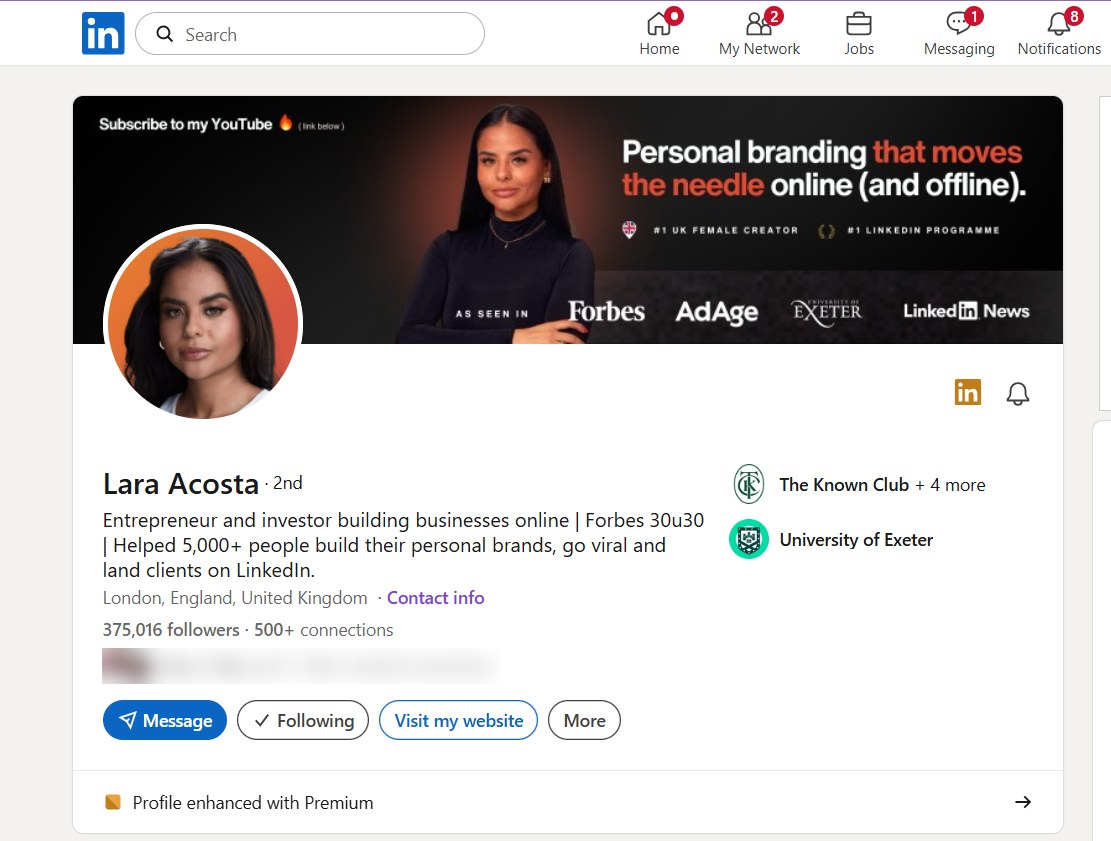
Lara was born in Mexico and moved to the UK at 15. In December 2021 she was unemployed in London, with about $500 in the bank, a student room and a broken chair, watching friends get promoted while she got rejected.
She has written about being rejected more than 200 times and feeling unqualified. At one point she deleted LinkedIn because watching everyone else progress made it worse.
Then she came back and made one decision: post 3 times a week for at least 3 months, without exception.
By December 2022 she had 17,389 followers. Not viral. Just steady. The stories she was embarrassed about, the rejections and the broken chair, became the posts people connected with most, and growth compounded from there.
What she did next is the part I respect most. She didn’t stop at followers. She built LA Digital, a personal-branding agency, then Literally Academy, which teaches founders to write on LinkedIn, and co-founded Kleo, an AI writing tool for LinkedIn creators. In 2026, Forbes put her on its 30 Under 30 list for media and marketing.
Don’t only write “how to build a business.” Write how you built yours: the rejections, the first client, the month it almost died. My experiment will carry those stories too, including the weeks that don’t work.
King-Inneh Joseph: from unpaid rent in Mararaba to a Nigerian LinkedIn brand
This one is close to home.
Inneh finished NYSC in Mararaba, on the edge of Abuja, hoping for a job at the National Assembly or ECOWAS. He has written that he sent more than 50 applications and got no interview, and that he was eventually sent out of his one-room apartment because he couldn’t raise the year’s rent.
If you’ve ever refreshed your inbox waiting for a reply that never came, you know that feeling.
He stopped waiting. He learned social media marketing and selling online, started posting what he was learning on LinkedIn, and built a business around digital products, affiliate commissions, coaching and training. He says the commission business alone paid him over ₦10 million in a year, with some months at ₦200,000 and others above ₦1 million. His numbers, his words, not an audited statement.
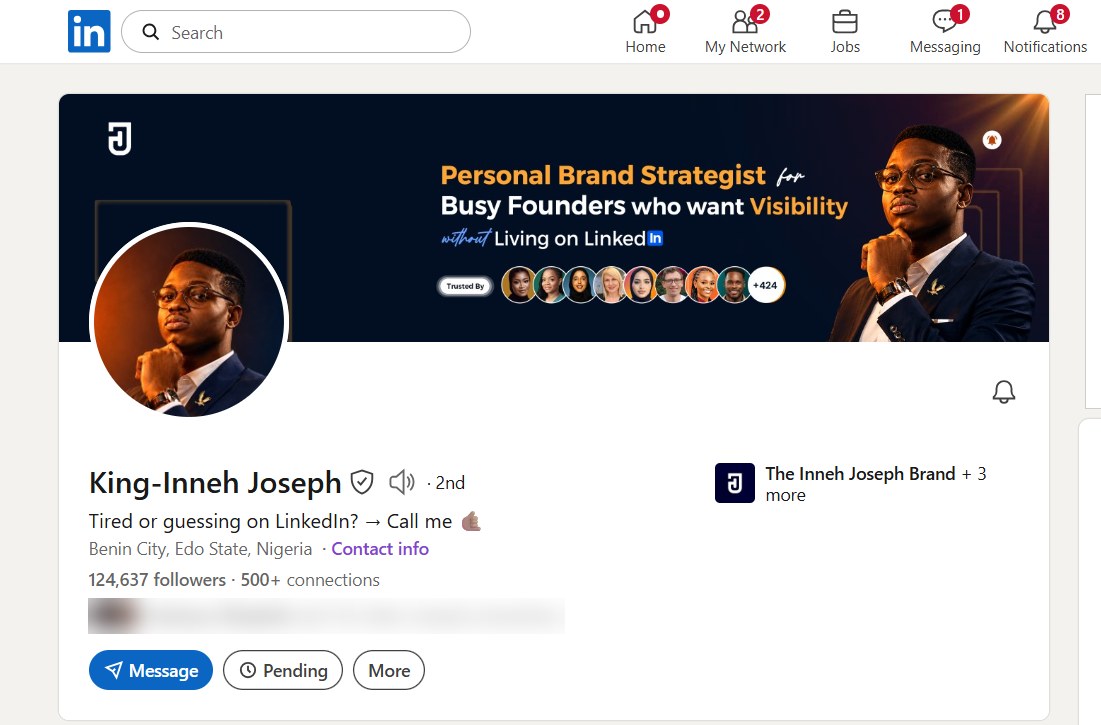
Today his headline is seven words long: “Tired or guessing on LinkedIn? Call me.” His profile sells one thing, personal branding for busy founders, and 124,637 people follow it.
A skill earns you money. Positioning makes people understand why they should choose you. Inneh learned marketing first, then learned to be found. Most Nigerians I meet on LinkedIn have the skill and skip the positioning, which is exactly what the profile section below fixes.
What the three have in common
| Person | Started with | What grew them | What they built |
|---|---|---|---|
| Jasmin Alić | Teaching, copywriting and a music career | Comments treated as content, consistency, relationships | Link Up community, coaching, an agency |
| Lara Acosta | Unemployment, rejection, $500 | Personal stories, 3 posts a week, a creator peer group | LA Digital, Literally Academy, Kleo |
| Inneh Joseph | No job after NYSC, unpaid rent | A marketable skill, teaching what he learned, clear positioning | Coaching, digital products, a personal brand business |
They developed something worth talking about. They made it visible. They gave people a reason to remember them. They built relationships around that visibility. And they turned attention into something they own.
That last step is the whole point, and it’s why follower counts are the least interesting number in this guide.
I’m from Anambra, I run my agency from Ibadan, and I know what it costs to build a professional reputation from here: buyers who hesitate at a Nigerian address, the pressure to look bigger than you are, the “are you sure they’re real?” call before the first invoice.
I’ve also seen what happens when you combine one valuable skill with visibility, proof and a clear offer. That’s how a London training business, a Coventry clinic and a utilities company in California ended up paying a team in Ibadan.
So I don’t treat LinkedIn as just another social network. It’s part of a system that connects what I know, Greenlearners Technologies, this website, our case studies and the people we want to serve.
That’s the system the rest of this guide hands you.
Why Getting Followers On LinkedIn Got Harder In 2026
On March 12, 2026, LinkedIn announced it had rebuilt its feed.
Its own words: “We want the Feed to be relevant to your interests, not a popularity contest.”
In plain English, three things changed.
- LinkedIn now reads what your post is about: its engineering team says it uses large language models to understand the subject of a post and match it to each member’s professional interests, including people who don’t follow you yet.
- It reads you, too: the profile details you choose to share, like your industry, skills, experience and location, and how you engage over time, all feed into what it shows and to whom.
- It’s cutting the shortcuts: LinkedIn says it is reducing automated comments, engagement pods, unauthorized tools, “comment YES to agree” bait and recycled, repetitive posts.
So I think of LinkedIn growth in 2027 as a triangle.
When all three agree, LinkedIn can confidently put you in front of the right strangers.
When they don’t, it can’t tell who you’re for, so it shows you to almost nobody.
Picture a Nigerian SEO consultant whose headline says “SEO Specialist | Helping Businesses Grow.”
Her posts bounce between football, crypto, motivation and the occasional SEO tip.
Nothing wrong with having interests, but LinkedIn can’t match her to people who need SEO, because her content doesn’t say SEO often enough.
Your job in 2027 isn’t to trick the algorithm. It’s to make your expertise, your content and your audience easy to understand.
That’s the lens for everything that follows, and it’s why the first thing I’ll change for my own experiment is not my posting schedule but my headline.
Personal Profile Or Company Page: Which Should You Grow?
Before you learn how to get more followers on LinkedIn, decide where those followers should go.
For most people, the answer is both, but not equally.
Grows fastest, because LinkedIn’s feed favors people over logos.
Richard van der Blom’s Algorithm Insights 2025 report, from 1.8 million posts, found personal profiles got about 561% more reach than company pages.
Best for founders, consultants, freelancers, job seekers and salespeople.
Grows slower, but belongs to the business, not one person.
The same report found company page posts reached about 1.6% of their followers on average.
Best for hiring, trust checks, ads and proving the business is real.
Here’s how I run it at Greenlearners Technologies.
My profile is where people meet me.
Our company page is where they check that the business is real before they message me.
When a UK clinic owner reads a post of mine about Google and Instagram ads, she clicks my name, not my logo.
Then, before she pays anyone, she visits the page, reads the reviews on our website and asks for a call.
So grow your personal profile first, and use it to feed your LinkedIn business page.
The Math Behind 424 Followers A Day
Every LinkedIn follower comes from someone who saw something of yours and decided they wanted more.
So follower growth is mostly two numbers multiplied together.
New followers = impressions × your follow rate
Your follow rate is how many people follow you for every 1,000 impressions your posts and comments get.
Find yours in LinkedIn: open your analytics for the last 28 days, divide new followers by post impressions, then multiply by 1,000.
Say your follow rate is 4 per 1,000 impressions.
To gain 424 followers a day, you’d need about 106,000 impressions a day.
That sounds impossible, until you see the two levers you control.
| Your follow rate | Daily impressions for 424 followers | What that profile usually looks like |
|---|---|---|
| 2 per 1,000 | 212,000 | A vague headline and mixed topics |
| 4 per 1,000 | 106,000 | A clear headline, one niche, a strong Featured section |
| 8 per 1,000 | 53,000 | A known face in a niche, posting work people save and share |
These follow rates are worked examples, not LinkedIn averages. LinkedIn doesn’t publish a typical follow rate, so use your own analytics.
Lever 1 is reach: more people seeing your posts and comments.
Lever 2 is your follow rate: more of those people deciding to follow.
Most people only push lever 1 by posting more. The fastest growth comes from pushing both at once.
For my own experiment, that means a sharper headline and Featured section in week 1, before I post a single new piece.
Free 30-Day LinkedIn Follower Planner
Put in your own numbers and see what your current pace can bring in 30 days, in three scenarios, and what it would take to hit your goal.
Use your LinkedIn analytics for the last 28 days, so the plan starts from what’s true today.
How To Increase Followers On LinkedIn In 30 Days
This is the plan I’m running for my experiment.
It works for a personal profile, and the company page section shows how to run it for a business page too.
0Before Day 1: Pick Your 3 Topics
Choose 3 topics you can post about every week for a year, and that connect to what you sell or want to be hired for.
Mine are getting customers online, growing social media followers that buy, and building a business from Nigeria for clients abroad.
A bookkeeper might pick small business tax, cash flow and pricing, while a recruiter might pick hiring, salaries and job search.
This is the identity side of the triangle, and LinkedIn’s 2026 feed rewards it.
1Days 1 To 3: Rebuild Your Profile For Follows
Make Follow your main button, rewrite your headline, update your banner and pin your 3 best pieces to Featured.
Do this first, because every post you publish this month sends visitors to your profile.
A profile that doesn’t say why someone should follow you wastes all that traffic.
The full checklist is in the profile section, and you can score yours with the free audit.
2Every Day: Post Once, Then Spend 30 Minutes In Other People’s Comments
Publish 1 post a day about one of your 3 topics, at the same time each day, like Tobi Oluwole has done at 10 a.m. for five years.
Before and after you post, leave 10 to 20 thoughtful comments on posts by bigger accounts your future followers already read.
Reply to every comment on your own posts within the first hour.
That daily loop is the engine of the whole plan, and if you can’t do all of it, the three routines below show what to cut.
3Days 4 To 10: Test Every Format
Rotate through a story, a how-to list, a document post, a short vertical video and a strong opinion.
Write down the impressions and new followers each one brings.
By day 10, you’ll know which 2 formats your audience wants more of.
4Day 7: Launch Your Newsletter
Launch a LinkedIn newsletter about your strongest topic.
When you create it, LinkedIn lets you invite your connections and followers to subscribe, which puts your name in front of your whole network at once.
The details are in the newsletter section.
5Days 11 To 20: Double Down And Collaborate
Post more of the 2 formats that won, and stop the ones that didn’t.
Team up with 2 or 3 people in your niche for a shared post, a LinkedIn Live or a co-written document.
Each collaboration shows you to an audience that already trusts the person you’re working with.
6Days 21 To 30: Bring In Followers From Everywhere
Ask your audience on WhatsApp, email, Instagram and YouTube to follow you on LinkedIn, and tell them why.
Add your LinkedIn link to your email signature, your website and every bio you have.
Then repost your best 3 ideas from the month as new posts with a fresh angle, because most of your new followers never saw them.
Pick the routine you can actually keep
My plan above is the intensive version, because I’m running an experiment with a team behind me.
If you work eight hours a day, have clients and a family, you need a version that survives a bad week.
| Routine | Who it’s for | Each week |
|---|---|---|
| Minimum viable | Busy professionals and employees | 3 useful posts, 5 to 10 real comments on active days, replies to genuine comments, one look at analytics |
| Growth | Consultants, freelancers, founders | 4 to 5 posts, 10 to 15 comments on active days, 1 document post or video, 1 collaboration every week or two |
| Intensive (my experiment) | A dedicated 30-day push | 1 strong post a day, 15 to 25 comments a day, a daily engagement window, format tests, daily analytics, a weekly review |
These are routines I’d recommend, not LinkedIn rules. The point is to pick one you can keep for 30 days, then measure.

Our social media marketing services can rebuild your profile or company page, plan your 30 days of posts and run it with you. Tap a button at the end of this guide.
Starting From Zero: Set Up Your LinkedIn Account The Right Way
If you already have a profile, skim this and jump to the profile section.
If you’re opening a LinkedIn account for the first time, or you opened one years ago and never touched it, do these seven things first, in this order.
I took every screenshot below inside my own account on November 11, 2026, so you can see exactly where each setting lives. LinkedIn moves things around, so if a menu looks different in your LinkedIn app, type the setting’s name into the search box in Settings.
1Open The Account With An Email You’ll Keep
Sign up at linkedin.com with a personal email address you’ll still own in ten years, not a work email that disappears when you change jobs.
Use your real name, spelled the way clients spell it, because your name becomes part of your LinkedIn profile URL.
Do the setup on a laptop. Post and reply from the LinkedIn app on your phone, which is where most of your readers are too.
2Lock It Before You Grow It
Go to Me, Settings & Privacy, Sign in & security. Turn on two-factor verification, add a backup phone number and check “Where you are signed in.”
An account that gets hacked in the middle of a growth push sets you back months, and recovery is slow when you need it fast.

3Claim Your LinkedIn Profile URL
Open your profile and look at the right-hand panel, Public profile & URL. Click the pencil and change the random letters and numbers to your name.
Mine is linkedin.com/in/chukwuemeka-maduka. A clean LinkedIn profile link is easier to put on your website, your email signature, your business card and your invoices, and it looks like you know what you’re doing.

4Verify Your Identity
Open the Me menu and tap Verify now. Verification is free, with a government ID through LinkedIn’s verification partner where your country is supported, or with a work email.
Yes, my own menu still shows the button. It’s the first thing on my day 1 list.

5Let Anyone Follow You
Go to Settings & Privacy, Visibility. Set Follow visibility to Anyone on LinkedIn, then open Followers at the bottom and turn on Make follow primary.
Without this, strangers who like your post see a Connect button, hit your 30,000 cap one day, or simply don’t bother.

6Find Your LinkedIn Analytics And Write Down Your Baseline
Go to Me, View profile, then Analytics, Show all. This is your LinkedIn analytics dashboard: post impressions, total followers, profile viewers and search appearances.
Here’s mine today, and it isn’t pretty: 39 post impressions in 7 days, 249 profile viewers in 90 days, 24 search appearances, and a weekly progress panel that says “No posts yet” and “No comments yet.”
That’s what “barely trying” looks like in numbers. Screenshot yours before you change anything, because in 30 days you’ll want to know where you started.

7Create Your Company Page Later, Not Today
The For Business grid at the top right holds Create a Company Page, along with Advertise on LinkedIn, Sales, Premium and Admin Center.
Don’t create the page on day 1. Build your profile first, publish for two weeks, then create the LinkedIn business page and let your profile feed it. The company page section shows exactly how.

Twenty minutes, done once. Everything above is free, and none of it needs LinkedIn Premium. Now your account is secure, findable and set up to collect followers instead of connection requests.
How To Set Up Your Profile So People Follow You
You publish a useful post.
Someone likes it, clicks your name and lands on your profile.
Then they leave.
Not because your post was bad, but because your profile didn’t give them a clear reason to stay connected.
Your profile is a landing page, not an online CV, and it has about 5 seconds to answer one question: why should I follow this person?
That’s what LinkedIn optimization really means. Not keywords stuffed into a summary, but a profile that answers that question before the visitor scrolls.
1Make Follow Your Main Button
LinkedIn retired creator mode in 2024 and gave its tools to every member.
To show Follow instead of Connect, go to Me, then Settings & Privacy, Visibility, Followers, and turn on Make follow primary.
On the same screen, set who can follow you to Everyone on LinkedIn.
This matters because LinkedIn caps you at 30,000 connections, but there’s no cap on followers.
2Write A Headline That Earns The Follow
Your headline appears next to every post and comment you make, so it’s your most-read sentence on LinkedIn.
Use this formula: who you help + the result + how.
Let me be honest about mine.
Today it reads “Sales Funnel Strategist & Paid Ads Specialist | Meta Ads, Google Ads, SEO, CRO, AI SEO, Email Automation | 6-8x ROAS | 300-400% ROI…”
That’s a list of what I do, and it has brought me clients, but it doesn’t tell a stranger what they’ll learn by following me.

For the experiment, I’ll test: “I help business owners in Nigeria, the UK, the US and Canada get customers online, and I show my numbers.”
I’ll report which headline brought more follows per profile visit.
3Use A Clear Face And A Banner With A Promise
Use a recent photo where your face fills most of the frame and you look at the camera.
Use the banner to say what you post about and how often, like “A new customer-getting lesson every weekday.”
Matt Gray calls his banner and one-liner the storefront that never closes, and he’s right.
4Make Your About And Featured Sections Sell The Follow
The first 2 lines of your About section show before “see more,” so put your promise and your proof there.
Pin 3 things to Featured: your best-performing post, your newsletter and one useful thing people can get from you.
Tobi Oluwole keeps one link in Featured, and 98% of his revenue starts there, because a visitor with one clear next step takes it.

5Turn On Services So Buyers Can Find You
Tap Open to, then Providing services. LinkedIn adds a Services section under your headline, a Request services button, and lists you in its Services Marketplace, which is where some buyers search instead of Google.
List the 3 to 8 things you actually sell, in the words a client would type. Mine are below, and you can see how Featured sits right under them.

6Verify Your Profile
LinkedIn has reported that verified members see up to 60% more profile views and up to 50% more engagement.
I’ll admit it: as I write this, my own profile still shows the “Verify in 2 minutes” button.
It’s on my day 1 list, and I’ll report whether profile views move after I do it.
The journey your profile has to survive
- Discovery: someone sees your comment or post and gets curious.
- Visit: they open your profile and scan your photo, headline and banner in seconds.
- Proof: they look at About and Featured for a reason to trust you.
- Follow: your profile turns attention into an ongoing relationship.
- Return: your next posts build familiarity.
- Enquiry: they message you, visit your website or refer someone.
Every step you fix raises your follow rate, and your follow rate is the lever most people never touch.
One free score worth checking: LinkedIn gives every member a Social Selling Index at linkedin.com/sales/ssi, 0 to 100 across four pillars worth 25 points each: your professional brand, finding the right people, engaging with insights and building relationships. The SSI was built for Sales Navigator users, but you don’t need a subscription to see yours. I’ll publish mine on day 1 and day 30. Don’t chase the score, it’s just a mirror of the habits in this guide.
Free LinkedIn Profile Follow Audit
Tick what’s already true on your profile and get a weighted LinkedIn optimization score, because the Follow button and your headline matter more than a custom URL.
Tobi Oluwole: From 1,000 Connections To 400,000 Followers
Of the 27 videos I studied, this one stood out because Tobi shows the boring truth behind a big number.
He went from 1,000 manually added connections in 2020 to 400,000 followers and over $6 million in revenue, posting every weekday at 10 a.m.

“How I Got 400,000 LinkedIn Followers (And Made $6M)” by Tobi Oluwole on YouTube.
Here’s what to take from it, with the timestamps.
- Rule 1, post at the same time every weekday: his first posts got about 24 likes, it took a year to reach 10,000 followers, and 1,849 posts later he’s at 400,000 (0:38).
- The post that changed everything was personal: a story about changing his name on his resume from Ola Toby to Toby hit 200,000 impressions from a 1,000-connection account (1:17).
- Consistency compounds like a TV show: when people know when to expect you, they come back (2:03).
- Rule 2, tell stories, not facts: he’d posted on and off for four years with no results until he told a story, and the first two story posts did 300,000 and 500,000 impressions (3:30).
- Three places to find stories: your own experience, the people around you, and people you’ve read about (6:04).
- Stories beat AI: he says over 40% of LinkedIn content is now AI-generated, and AI can’t tell a personal story that makes a reader feel something (6:52).
- Rule 3, pick an enemy: his is depending on a corporate job as your only income, and he’s posted against it every week for five years (7:32).
- Rule 4, make posts snack-sized: 8 to 12 lines, one sentence per line, third-grade English, written like you’re talking to a friend (9:35).
- Always add one visual: on the feed everyone gets two lines and one image, and the image takes about 80% of the screen (10:38).
- Rule 5, send everybody to a funnel: he’s met people with 40,000 followers making zero dollars (11:36).
- Treat your profile like a landing page: banner says who you help, bio tells your story, Featured has one link (12:00).
- Collect the email: LinkedIn is a borrowed audience, your list is the one you own (12:23).
- Never miss momentum: when a post takes off, add a call to action in the post or the comments (13:00).
- LinkedIn as a bank account: every valuable post is a deposit, one withdrawal a week (13:27).
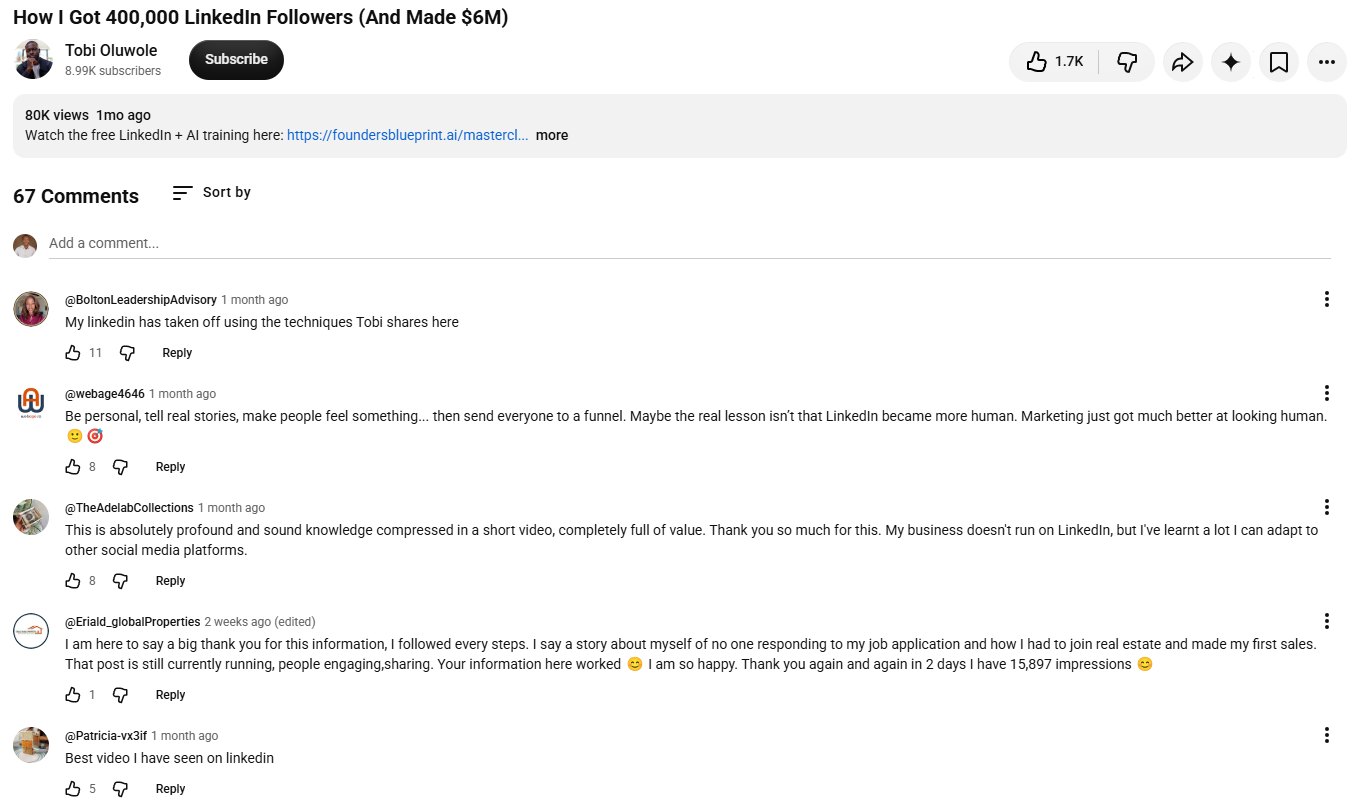
One viewer followed the rules, told a story about nobody replying to her job applications, and reported 15,897 impressions in 2 days. That’s the storytelling rule working for a normal person, not a celebrity.
What I’m taking from Tobi: a fixed posting time, one personal story a week, and one enemy.
Mine is marketing you can’t measure.
I’ve watched too many business owners pay for “awareness” and “branding” with no number attached, so every post I write in the experiment will carry a number someone can check.
What To Post To Gain Followers On LinkedIn
Knowing how to grow followers on LinkedIn mostly comes down to what you post, and this is where most LinkedIn marketing advice goes wrong: it tells you how often to post and never what for.
People don’t follow you for one good post.
They follow you when one good post makes them believe the next ones will be just as useful.
| Format | What it’s best for | What to measure |
|---|---|---|
| Text posts | Opinions, stories, lessons and a clear point of view | Comments, profile visits, follows |
| Document posts | Frameworks, checklists and step-by-step guides people swipe through and save | Saves, shares, follows |
| Short vertical video | Demonstrations, personality and explaining something complex fast | Watch time, meaningful comments, follows |
| Image posts | Visual proof, screenshots, behind-the-scenes moments, value-dense graphics | Profile visits, reposts |
| Polls | Learning what your audience wants, sparking a discussion | Answer quality, not reach |
| Newsletters | Depth, and a recurring relationship that reaches inboxes | Subscribers, returning readers |
A format isn’t successful because it gets more reactions. It’s successful when it helps the right person understand your expertise and gives them a reason to follow you. Test 2 or 3 formats for 10 days and let your own analytics pick the winner.
The best times to post on LinkedIn
Buffer analyzed 4.8 million LinkedIn posts and found its highest engagement on Wednesday at 4 p.m., then Friday at 3 p.m. and 4 p.m., with weekday afternoons between 3 p.m. and 8 p.m. doing best overall and Monday and Tuesday doing worst.
Other studies say mornings. They’re all averages of other people’s audiences, so here’s my rule.
Post when your buyers are awake and in their own time zone, not yours. My readers are in Nigeria, the UK, the US and Canada, so I post late morning West Africa time, which catches the UK at breakfast and North America before their day starts. During the experiment I’ll test two fixed times and report which one earned more follows per 1,000 impressions, which is the only time-of-day number that matters.
The shape of a post that gets follows
- A first line that stops the scroll: a number, a surprising result or a clear promise, because only the first 2 or 3 lines show before “see more.”
- One idea only: a post that teaches one thing well beats a post that lists everything you know.
- Short lines and white space: most people read LinkedIn on a phone, so write one sentence per line.
- Proof from your own work: a number, a screenshot or a real client lesson, with private details removed.
- A reason to follow at the end: say what you’ll post next, like “Tomorrow: the 3 headline mistakes I see every week.”
When I tested this at Greenlearners Technologies for one of our clients, a London training business, the posts that named a real number in the first line were the ones that got shared into WhatsApp groups and brought in enquiries.
You’ll be tempted to let a tool write your LinkedIn posts, so let me be clear about where I stand. Technology will keep advancing, and I use AI every day at Greenlearners Technologies. But people buy from people. The flood of AI-written posts, the slop, has made readers hungrier for a real human expert they can believe, not less hungry.
Even at its peak, AI is still a tool built by humans to do human work faster. Marketing existed for centuries before the internet, and it will exist for as long as people buy from and sell to each other, which isn’t ending any time soon.
So let AI tidy your draft, research your topic or build your schedule. Don’t let it replace the one thing people followed you for: you.
On links: many LinkedIn analysts report lower reach on posts with outside links, and LinkedIn hasn’t confirmed a rule either way. My approach: give the full value in the post, put the link in your Featured section, newsletter or first comment, and test both on your own account.
Free LinkedIn Story And Post Builder
Tobi’s biggest lesson was stories, not facts, so this tool doesn’t hand you hooks to copy.
It asks for the raw material of something that really happened to you, then shapes it 6 ways.
Matt Gray: 846,000 Followers In 36 Months Without Ads
The second video is the system view.
Matt Gray grew to 846,000 followers in 36 months, at times over 100,000 a month, with no ads, and he breaks the machine into three parts.

“how to BEAT the new LinkedIn algorithm in 16 minutes” by Matt Gray on YouTube.
- The numbers: 846,000 followers in 36 months, up to 102,000 a month, 59 million organic views a month, without spending on ads (0:54).
- What most people get wrong: they use LinkedIn like a resume instead of a sales engine, post random content with no system and chase vanity metrics (2:08).
- The three parts: a profitable profile, an engagement machine and a content system (2:50).
- Own one word: his one-liner is “systems I use to grow faster,” the way James Clear owns habits (4:13).
- Value-dense images: one hand-drawn image summarising a post took it to over 24 million organic views (5:50).
- Four post types: behind the scenes, value-packed images, deep “how I do it” systems and personal stories (6:31).
- The call to action has three jobs: ask for a repost, ask for a follow, and offer a lead magnet that matches the post’s topic (7:55).
- First three lines: curiosity, then data or identity, then a promise of immediate value (9:33).
- Review every 30 days: study your top 10% of posts and double down on them (12:39).
- The engagement machine: he aims for 30 or more real people engaging within 45 minutes of posting (13:15).
- His growth checklist: banner with a call to action, value headline, two Featured items, follow 20 relevant creators, build relationships off-platform, track your top posts, review analytics monthly (14:19).
- Get 10% better each post: focus on how fast you learn, not how fast you grow (15:12).

The most-liked comment under the video, with 173 likes, makes the point I’d make too: much of this system assumes you already have a network of creators engaging early. Starting from zero is different.
Here’s where I’ll disagree with part of it.
LinkedIn’s March 2026 update says it is reducing the reach of engagement pods and automated comments.
So I won’t build a 30-person machine that comments on command, and I won’t advise you to.
What I will do, and what I think Matt is really describing, is build a genuine peer group of 10 to 20 people in my niche who actually read each other’s work and comment because they have something to say.
The difference is simple: a pod comments whether or not it read the post. A peer group reads first.
What I’m taking from Matt: one word to own, a value-dense image on my best posts, and a 30-day review of my top 10%.
How To Turn LinkedIn Comments Into Profile Visits And Followers
If you’re wondering how to get more followers on LinkedIn without posting more, start with comments.
When you leave a sharp comment on a big post, thousands of people can read it, and your headline sits right next to your name.
Some of them click, read your profile and follow you, without you posting that day.
It isn’t guaranteed, and a comment on a post seen by 500 people is not a comment on a post seen by 500,000, so pick your spots.
- Relevance: respond to the actual point the person made.
- Specificity: add an example, a number or an observation from your own work.
- Perspective: bring a useful angle instead of agreeing.
- Conversation: answer replies, because a thread keeps your name on screen longer.
- Timing: early comments tend to get read more, so treat the first hour as an experiment on your own account, not a rule.
“Great post. Very insightful!”
“The follow-up point is the one most people skip. I’ve seen businesses spend real money getting enquiries, then lose them because nobody replied within a day. Getting leads and following them up have to be one system.”
That second comment is something I actually believe, and it’s the kind of comment that has brought business owners to my profile.
Pick 20 to 30 bigger accounts whose followers are the people you want, turn on their notifications, and show up in their comments every day.
Launch A LinkedIn Newsletter
A newsletter is the one LinkedIn feature that gives you a reason to tap your whole network on the shoulder at once.
When you create one, LinkedIn lets you invite your connections and followers to subscribe.
Not everyone will accept, but every invitation is your name in front of someone who already knows you.
After that, subscribers get a notification and an email for each new edition, so your best work no longer depends on the feed.

- Name it for the reader: “Clinic Growth Weekly” beats “Musings From Dr. Ade.”
- Keep a rhythm you can hold: weekly or every two weeks, on the same day.
- Launch on a strong week: your first edition gets the biggest invite, so make it your best piece.
- Turn every edition into posts: one newsletter can become 3 to 5 feed posts that point back to it.
- Know the four levels: following you, following your page, subscribing to your newsletter, and joining the email list you own. Only the last one is yours if LinkedIn changes the rules.
That last point is why my team manages 400,000+ email subscribers across client lists, and why one of our 2027 targets is 100,000 subscribers on our own list.
How To Get More Likes On LinkedIn
Likes and followers are linked, but they aren’t the same thing.
A post can get 500 likes from your existing network and still bring in very few new followers.
Here’s how to get more likes on LinkedIn that also turn into follows.
- Write for one person: a post that sounds like it’s for “everyone” gets skimmed by everyone.
- End with a real question: ask something your readers can answer from their own experience.
- Post when your audience is online: check when your followers engage, and test 2 or 3 posting times.
- Show your face: van der Blom’s report found posts with people in the image did up to 50% better than those without.
- Skip the bait: “like if you agree” posts are exactly what LinkedIn’s 2026 feed is built to bury.
How To Increase Followers On A LinkedIn Company Page
A company page grows slower than a person, but it can still grow every week, and for LinkedIn for business it’s the asset that stays when a founder leaves.
Let me show you mine first, because it’s embarrassing and useful.

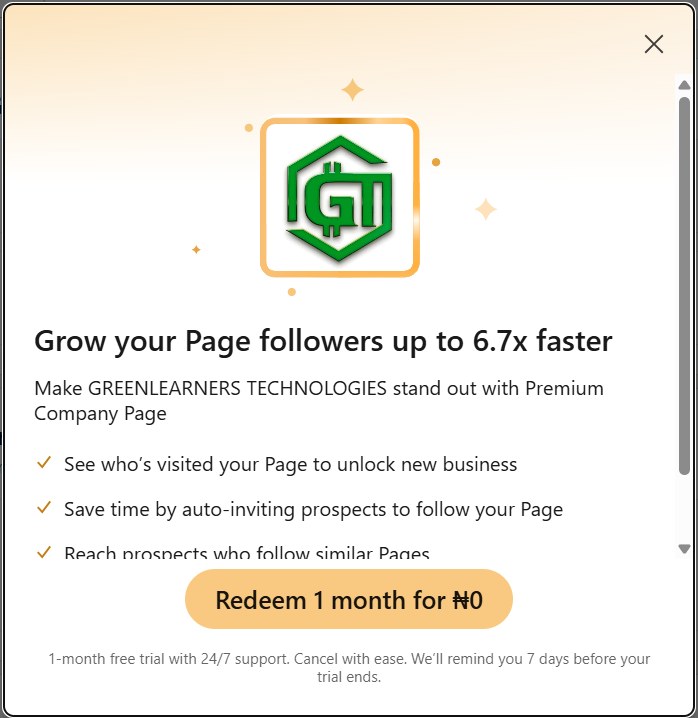
On November 11, 2026, the Greenlearners Technologies Page had 16 followers, no posts in 90 days and 2 visitors in a week.
Our clients found us through my profile, our website and referrals, and the page just sat there. So it’s part of the experiment: the plan below is exactly what I’ll run on it, and I’ll publish the page’s numbers next to my profile’s every week.
Here’s how to increase followers on a LinkedIn company page, in the order I’d do it, and the same steps work whether you call it a business page or a company page.
1Complete Every Section
Add your logo, cover image, overview, website, location, industry and a call to action button.
LinkedIn says pages with complete information get 30% more weekly views.
2Use Your Invite Credits Every Month
Page admins can invite their own connections to follow the page, using a monthly pool of credits shared between admins.
The number varies and LinkedIn says it’s changing, so check it in your Page admin view rather than trusting a number from a blog, including this one.
An accepted invite returns its credit, and unused credits don’t roll over, so invite people who’d genuinely care, every month.
3Let The Founder And The Team Carry The Page
Your page doesn’t have to carry the whole load.
At Greenlearners Technologies, I share the strategy and the numbers, our content manager shares what works in content, our developer shares website and conversion lessons, and the page publishes the case studies and announcements.
Ask every employee to add the company to their experience, follow the page and share its best posts, and use LinkedIn’s option to notify employees about an important post.
4Post At Least Every Week
LinkedIn says companies that post weekly see twice the engagement.
Lead with your people: team stories, customer wins and founder videos usually beat logos and announcements.
5Verify Your Page And Add A Follow Button To Your Website
LinkedIn has reported that verified pages gain about 7.7 times more followers than unverified ones, though pages that verify are often the ones already investing in LinkedIn.
Add LinkedIn’s follow button to your website, email signature and invoices, so customers can follow you in one tap.

LinkedIn recommends getting a new page to 150 followers early, because that’s where it says its growth tools start to help.
So if your page is brand new, your first job is reaching 150 with invites, your team and your customers.
Premium Company Page: LinkedIn’s paid page upgrade, listed from around $99 a month in the US at the time of writing and priced differently by market, can prompt engaged visitors to follow and auto-invite prospects. It helps a busy page convert visitors, but it won’t fix a page nobody visits.
How To Increase Followers On LinkedIn With Paid Ads
I run LinkedIn ads for clients, so let me be straight about what money can and can’t buy here.
There’s no ad that buys followers for a personal profile directly.
For a company page, you can pay to put your page, and your team’s best posts, in front of the right job titles, industries and countries.
| Your situation | What I’d do |
|---|---|
| New page with no clear positioning | Fix the page and content first, no ads yet |
| Strong organic post with relevant engagement | Boost it to the exact audience you want |
| Page gets visitors but few follows | Fix the page’s promise, not the budget |
| Need to reach specific decision-makers | Test a tightly targeted campaign |
| Plenty of followers but no enquiries | Check follower quality and your offer before spending |
My rule: paid reach can buy distribution, it can’t buy trust.
Paid followers who land on a strong post stay, while paid followers who land on a weak page forget you by Friday.
If you want LinkedIn ads run properly, our social media marketing services set them up around a target you can measure.
LinkedIn Premium, Sales Navigator, Recruiter Lite And Campaign Manager: What’s Worth Paying For
Every week someone asks me whether LinkedIn Premium will grow their followers.
Short answer: no. Longer answer: it depends which product you mean, because LinkedIn sells at least six, and most people mix them up.
| Product | US price at the time of writing | Built for | Does it grow followers? |
|---|---|---|---|
| Premium Career | About $39.99 a month, less on an annual plan | Job seekers: who viewed your profile, InMail, LinkedIn Learning access, applicant insights | No. Useful for a LinkedIn job search, not for reach. |
| Premium Business | About $59.99 a month | Unlimited profile browsing, more InMail, company insights, the gold Premium badge | Not directly. The badge adds a little trust on a crowded profile. |
| Sales Navigator Core | About $99.99 a month | Advanced lead search, saved lead lists, account alerts, Smart Links | No, but it’s the best tool for finding the exact people you want as followers and clients. |
| Sales Navigator Advanced | About $149.99 a month | Team features, CRM sync, TeamLink | No. Sales teams only. |
| Recruiter Lite | About $170 a month | Hiring: candidate search, InMail to candidates, pipeline tools | No. For recruiters and small hiring teams. |
| Premium Company Page | From about $99 a month | Page visitor insights, auto-invite, follow prompts, custom call to action | Partly. It converts existing visitors into followers. |
| Campaign Manager (LinkedIn Ads) | Pay as you go, from about $10 a day | Sponsored posts, Thought Leader Ads, Follower Ads, lead gen forms | Yes, for a page, if the content holds them. |
Prices from LinkedIn’s US pricing as compiled in April 2026 and LinkedIn’s own plan pages. LinkedIn prices by country and changes plans often, and in Nigeria you’ll usually see naira prices and trial offers like the one my Page got, so check premium.linkedin.com and the Sales Navigator pricing page before you decide.
Here’s how I actually use them.
- Sales Navigator, in sprints: I turn it on for a month when I’m building a list for a campaign, use its filters to find decision-makers in one industry and one country, save them to a lead list, then follow their posts and comment for two weeks before anyone hears from me. That’s LinkedIn lead generation without a single cold pitch. Then I pause it.
- Smart Links: a Sales Navigator feature that wraps your proposal or case study in a trackable link, so you see who opened it and for how long. Great for follow-up, useless for followers.
- LinkedIn Campaign Manager, for clients: this is the LinkedIn ads manager where every LinkedIn advertising campaign is built and measured. I run it for businesses that need pipeline faster than organic can deliver, and I manage client ad accounts and pages through LinkedIn Business Manager so nobody shares passwords. LinkedIn advertising costs more per click than Meta or Google, so it earns its place only when one customer is worth a lot.
- Premium Career, only if you’re job hunting: recruiters search by headline keywords and skills, not by follower count. If you’re using LinkedIn for a job search, the profile steps above matter more than the plan, and uploading your resume to LinkedIn’s Easy Apply settings is free.
- LinkedIn Learning: it comes with Premium and many libraries offer it free. Good for skills, irrelevant to followers.
- Scheduling tools like Taplio: I don’t rely on them. LinkedIn’s own scheduler is free, and the 2026 feed is built to spot tools that post, like and comment for you. Write it yourself, schedule it natively, show up for the first hour.
- The LinkedIn API: it’s for approved partners building products, not a growth hack for individuals. Anything that promises to “automate” your profile through it is risking your account.
My spending rule: pay for tools that help you find and understand the right people, never for tools that pretend to be you. Every subscription on this list is optional for the 30-day plan. The only thing you can’t buy is the habit.
How I Grow LinkedIn Followers Abroad From Nigeria (Without Pretending To Be Local)
This is the section I wish someone had written for me in 2019.
I’m based in Ibadan, and most of my clients are not.
A London training business, a Coventry clinic, a utilities company in California and a Canadian B2B software business all found a Nigerian marketer credible enough to pay.
None of that happened because I pretended to be somewhere else.
1Post Examples From The Market You Want
If you want UK clients, write about UK problems: Google Business Profiles for a Coventry clinic, Meta ads for a London course provider.
A web designer in Ibadan who wants clients in Lagos, Abuja, London and Toronto shouldn’t post “I build beautiful websites” every week.
He should post website mistakes that cost businesses enquiries, how to build for UK and US buyers, and what makes a landing page convert.
2Join That Market’s Conversations
Follow 20 creators and business owners in the country you want, and comment where their customers are reading.
Your headline, with your result, does the introduction for you.
3Make Your Expertise Easy To Evaluate
International buyers want to know what you’ve done, who you’ve worked with, what evidence you have, how you work remotely and what happens after they message you.
Put that in your About section, your Featured section and your website, with screenshots and reviews, so nobody has to take your word for it.
4Say Where You Are
My profile says Ibadan, Oyo State, Nigeria, and my headline says UK, US and Canada.
That combination is a filter, and it works: the people who message me have already decided a remote Nigerian team is fine, so the call is about results, not geography.
For readers across Africa, don’t treat the continent as one audience.
A Lagos founder, a Nairobi professional, an Accra entrepreneur and a Johannesburg SME owner are reading LinkedIn for different reasons, so write to one of them at a time.

LinkedIn says it has more than 1 billion members in over 200 countries and territories, and in Nigeria alone its ad tools showed 13.0 million members in late 2025, up 18.2% in a year.
That means a lot of competition for attention at home, and a lot of buyers abroad who have never heard of you yet.
Mistakes That Kill Your LinkedIn Growth
Some shortcuts don’t just fail, they can get your account limited.
Buy followers: LinkedIn now removes restricted accounts from follower counts, and fake followers never buy from you.
Join engagement pods or use tools that like, comment or connect for you, which break LinkedIn’s Professional Community Policies and are exactly what the 2026 feed is built to catch.
Stuff posts with hashtags: LinkedIn has been removing its hashtag feed, and now reads what your post is about.
Paste the same AI-written post everyone else is posting: recycled, repetitive content is on LinkedIn’s reduce list.
Grow real followers who match the people you want to work with, even if it’s slower at first.
Spend the time a pod would take on 10 to 20 real comments a day.
Write clearly about your topic in plain words, and add a few relevant hashtags only if they help a human.
Use AI to tidy your draft if you like, but start from something that happened to you.
- Posting about everything: if LinkedIn can’t tell what you’re about, it can’t find your audience.
- Going quiet for weeks: growth comes back slowly after a long break, so keep a steady rhythm.
- Ignoring comments: every unanswered comment is a conversation, and a follower, left on the table.
- Pitching every new connection: people follow teachers, not salespeople in their inbox.
- Celebrating the count: you can publish every day for a month and still see little growth, and that doesn’t mean LinkedIn is suppressing you. Find which step of the journey is failing before you post another 30 times.
Turn Your LinkedIn Followers Into Customers
Two people.
One has 35,000 followers. Reactions pour in, people congratulate her, and when she announces a service almost nobody enquires.
The other has 2,400 followers, mostly business owners and decision-makers who need what he sells, and he gets relevant conversations every week.
Who has the stronger LinkedIn presence?
If you sell something, it’s the second one, and that’s the whole reason I care about followers at all.
Here’s the system I use at Greenlearners Technologies to turn LinkedIn attention into revenue, and it’s the same system behind everything we build for clients. If you sell to other businesses, this is LinkedIn lead generation done properly: content first, conversation second, offer third. It’s also the backbone of our lead generation service and the 15 ways to get leads I wrote about separately.
- Discovery: someone sees your post, comment, newsletter or profile.
- Interest: they visit your profile to understand who you are and what you offer.
- Trust: your examples, numbers, reviews and consistency make your expertise believable.
- Relationship: they follow, subscribe, comment, connect or come back.
- Conversion: they visit your website, message you on WhatsApp, book a call or buy.
- Retention and referral: you deliver, follow up, and they send the next person.
| Stage | Illustrative numbers | Not the same as |
|---|---|---|
| Relevant people reached | 20,000 | Interest |
| Profile visits | 600 | Followers |
| New followers | 120 | Qualified prospects |
| Website visits | 40 | Enquiries |
| Qualified enquiries | 8 | Customers |
| New customers | 2 | Profit |
A hypothetical funnel, not an industry benchmark. Your numbers depend on your audience, offer, market and follow-up.
Measure the right things, every month.
- For a profile: net new followers, profile views, relevant connection requests, follows attributed to posts, real conversations and inbound messages that match your offer.
- For a page: page visitors, new followers, follower demographics, post performance, website clicks and enquiries that came from LinkedIn.
- For both: tag your website links with UTM parameters, so your analytics can show which LinkedIn posts brought visits, enquiries and sales. Then move the relationship somewhere you own: your email list or a WhatsApp community, because LinkedIn can change its feed again tomorrow.
You don’t need 100,000 followers to earn from LinkedIn, and you don’t need a single LinkedIn lead that came from a cold pitch.
A bookkeeper in Abuja with 1,200 of the right followers can fill her calendar, while an account with 50,000 random followers sells nothing.
Google is only one place your customers discover you, so LinkedIn, Instagram, YouTube, WhatsApp and AI search should all point to the same offer, and if you sell to other businesses, LinkedIn is often where that discovery starts.
So grow followers, but count the LinkedIn leads, calls and sales those followers bring.
Free LinkedIn Follower Quality Check
Before you chase more followers, find out how many of the ones you have are the people you actually want.
Open your last 50 to 100 new followers on LinkedIn, count how many match each line, and enter what you find.
Want help to grow your LinkedIn followers?
Whether it’s your own profile or your company page, our social media marketing services build your 30-day plan and run it with you, with numbers you can check.
- Profile and page setupHeadline, banner, About, Featured and company page, built to turn visitors into followers.
- 30 days of contentStories, document posts, short videos and a newsletter around your 3 topics.
- Followers to customersOffers, WhatsApp follow-up and lead generation that turn followers into clients.
Founders and professionals: tap Grow My Profile. Businesses: tap Grow Our Page. We work with clients in the US, UK, Canada, Nigeria and beyond, with real growth only, never bought followers.
Questions About How To Increase Followers On LinkedIn
Make Follow your main profile button, write a headline that says who you help and the result, and post about 2 or 3 topics every day.
Then leave thoughtful comments on bigger accounts in your niche, reply to every comment on your posts and launch a newsletter. Most new followers find you through a post or a comment, then follow after reading your profile.
The fastest safe route is a profile that converts visitors, one post a day, 20 thoughtful comments a day on bigger posts and a newsletter launch, which invites your whole network at once.
Short vertical videos and document posts also tend to reach further than text-only posts.
No safe way. Bought followers and engagement pods break LinkedIn’s rules, and LinkedIn removes restricted accounts from follower counts.
The closest thing to an instant boost is launching a newsletter, because your first edition invites all your connections and followers.
Complete every section of the page, use your monthly invite credits (check the number in your Page admin view, it varies), ask your team to follow and share, post at least weekly, verify the page and add a LinkedIn follow button to your website.
Founders and employees sharing page posts from their own profiles usually brings more followers than the page posting alone.
Everything in the 30-day plan in this guide is free: profile setup, daily posts, comments, collaborations and a newsletter.
Paid options only help once your organic posts already show that people want to follow you.
For a company page, yes. LinkedIn’s Follower Ads and boosted posts put your page in front of the people you target.
There’s no ad that buys followers for a personal profile directly, and you should never pay a service that sells followers.
A connection is a two-way relationship, and both people see each other’s posts. A follower sees your posts without you seeing theirs.
Every connection also follows you. You can have up to 30,000 connections, but there’s no limit on followers.
Go to Me, then Settings and Privacy, Visibility and Followers, and turn on Make follow primary.
On the same screen, set who can follow you to Everyone on LinkedIn.
No. LinkedIn removed the creator mode switch in 2024, and its tools, like follower-first profiles and newsletters, are now available to all members.
For fast growth on a personal profile, post once a day. If that’s too much, 3 to 5 times a week is still strong.
For a company page, LinkedIn says weekly posting brings about twice the engagement, and more often is better if quality holds.
Not much anymore. LinkedIn has been removing its hashtag feed, and its 2026 feed uses AI to understand what your post is about.
Use 1 to 3 relevant hashtags at most, and focus on writing clearly about your topic.
Write each post for one kind of reader, open with a strong first line, show your face, end with a real question and reply to every comment.
Posting when your followers are online and using images or video also helps.
It depends on your goal. 1,000 of the right followers can fill a consultant’s calendar, while 50,000 random followers may sell nothing.
Track the messages, calls and sales your followers bring, not just the number.
There’s no typical timeline, because it depends on your niche, your profile and how often you post and comment.
Use the free planner in this guide with your own numbers to see your likely pace, then update it every week.
It’s possible, but it isn’t typical. It needs about 424 new followers a day, which means daily posting, hours of commenting and several posts that reach far beyond your network.
I’m running that experiment in public in the first quarter of 2027, starting from 7,885 followers on November 11, 2026, and I’ll update this guide with my real results, good or bad.
Check your newest 50 followers. Count how many are in your target industry, in the countries you want, able to buy, and engaged with you this month.
If most of them are peers, students or people outside your market, change your topics and where you comment before you chase more followers. The free follower quality check in this guide does the math.
Yes. Most of my own clients are abroad, and they found me on LinkedIn while my profile clearly said Ibadan, Nigeria.
Post examples from the market you want, comment where those buyers read, show proof they can check, and say where you are. Credibility travels, pretending doesn’t.
It makes shortcuts harder and clarity easier. LinkedIn now uses AI to understand what each post is about and shows it to people with matching professional interests, including people who don’t follow you.
It also reduces engagement pods, automated comments and bait. If your profile, posts and audience all point to the same 2 or 3 topics, the change helps you.
Not directly. Premium doesn’t push your posts to more people.
For company pages, the separate Premium Company Page can prompt engaged visitors to follow, which helps pages that already get traffic.
At the time of writing, US prices run from about $39.99 a month for Premium Career and $59.99 for Premium Business, to $99.99 for Sales Navigator Core and around $170 for Recruiter Lite, with cheaper annual plans and different prices by country.
None of them push your posts to more people. They help you research, message and hire. The only paid products that add followers are the Premium Company Page, which prompts page visitors to follow, and LinkedIn ads through Campaign Manager.
The Social Selling Index is a free score from 0 to 100 at linkedin.com/sales/ssi, split into four pillars of 25 points: professional brand, finding the right people, engaging with insights and building relationships.
Check it once a month as a mirror of your habits. A rising SSI usually means your profile, comments and relationships are improving, which is the same work that grows followers.
Buffer’s analysis of 4.8 million posts found the strongest engagement on Wednesday at 4 p.m. and Friday at 3 p.m. and 4 p.m., with weekday afternoons from 3 p.m. to 8 p.m. doing best and Monday and Tuesday doing worst.
Treat that as a starting point. Post when your buyers are awake in their time zone, pick one or two fixed times, and let your own analytics choose the winner after 30 days.
Open the For Business grid at the top right of LinkedIn and choose Create a Company Page. Add your logo, cover, overview, website, location and industry, then publish.
Build your personal profile first and post for two weeks before creating the page, because your profile is what will send the page its first 150 followers.
Only a little. Recruiters, including those using Recruiter Lite, search by headline keywords, skills, location and experience, not by follower count.
A clear headline, a complete profile, the right skills and a few posts that show your thinking will do more for a LinkedIn job search than 10,000 followers.
Disclaimer
Greenlearners Technologies is an independent digital marketing business and is not affiliated with LinkedIn or Microsoft. LinkedIn is a trademark of LinkedIn Corporation.
LinkedIn settings, limits and features were checked against LinkedIn’s own pages and the sources below on November 11, 2026. LinkedIn changes its features often, and some depend on your country and account.
Follower growth varies widely by niche, audience, content and consistency. No method can guarantee a follower number, and anyone who sells guaranteed followers should be avoided.
How I researched this guide: I studied 27 YouTube videos on LinkedIn growth and watched the two featured above in full, read LinkedIn’s March 2026 feed announcement and engineering post, LinkedIn’s Pages best practices, help pages and Professional Community Policies, DataReportal’s Digital 2026 Nigeria report and coverage of Richard van der Blom’s study of 1.8 million LinkedIn posts. The profile, settings, analytics and company page screenshots are my own account on the date shown, the three creator profile screenshots are public LinkedIn profiles captured the same day with mutual connections blurred, and the comment screenshots are public YouTube comments. The stories of Jasmin Alić, Lara Acosta and King-Inneh Joseph come from their own posts, websites and interviews linked in the references, and their business figures are their own reported numbers. Prices for LinkedIn Premium, Sales Navigator and Recruiter Lite are US list prices at the time of writing and vary by country. I separate LinkedIn’s own statements from third-party studies and from my own experience, which I label as mine. The tools use only the numbers you enter, not your account’s data, and every result is a scenario, not a guarantee.
If you spot a mistake or an outdated feature, send it through our contact page, and we’ll check it and update this guide.
- LinkedIn (2026). How LinkedIn is improving the Feed to show more relevant, authentic professional content. news.linkedin.com
- LinkedIn Engineering (2026). Engineering the next generation of LinkedIn’s feed. linkedin.com
- LinkedIn Help. Invite connections to follow your LinkedIn Page. linkedin.com
- LinkedIn Help. LinkedIn newsletters overview. linkedin.com
- LinkedIn Marketing Solutions. LinkedIn company page best practices. business.linkedin.com
- LinkedIn. Professional Community Policies. linkedin.com
- LinkedIn. About LinkedIn. about.linkedin.com
- Microsoft Learn. LinkedIn Marketing API: Follower Ads. learn.microsoft.com
- DataReportal (2026). Digital 2026: Nigeria. datareportal.com
- WrittenlyHub (2026). LinkedIn engagement down 50%: what the Algorithm Insights Report 2025 reveals. writtenlyhub.com
- Hootsuite (2026). LinkedIn statistics. blog.hootsuite.com
- Social Media Today (2024). LinkedIn’s removing its creator mode option. socialmediatoday.com
- Digital Information World (2025). LinkedIn plans to remove hashtag feed. digitalinformationworld.com
- Search Engine Land. LinkedIn starts filtering connection, follower counts. searchengineland.com
- Go Fish Digital. LinkedIn follower credit strategy. gofishdigital.com
- LinkedIn Preview (2026). LinkedIn newsletter growth: how to get more subscribers. linkedinpreview.com
- AdaptlyPost (2026). LinkedIn Premium Company Page: features, benefits and pricing. adaptlypost.com
- Jasmin Alić (2024). My commenting strategy was featured by LinkedIn. LinkedIn post. linkedin.com
- Hey Jay. About Jasmin Alić. hey-jay.com
- CaptureFlow. Jasmin Alić (Link Up): a 67% comment rate on LinkedIn. captureflow.ai
- Lara Acosta (2024). I’ve been rejected over 200 times. LinkedIn post. linkedin.com
- Lea. Lara Acosta: from $500 in the bank to #1 female LinkedIn creator. meet-lea.com
- University of Exeter (2026). Exeter alumni included on prestigious Forbes 30 Under 30 list. news.exeter.ac.uk
- Inneh Joseph. Meet Coach Inneh Joseph. innehjoseph.com
- King-Inneh Joseph. LinkedIn profile. linkedin.com
- LinkedIn Sales Solutions. The Social Selling Index (SSI). business.linkedin.com
- LinkedIn Sales Solutions. Compare Sales Navigator plans. business.linkedin.com
- LinkedIn. LinkedIn Premium plans. premium.linkedin.com
- La Growth Machine (2026). LinkedIn Premium cost 2026: all plans explained. lagrowthmachine.com
- Buffer (2026). The best time to post on LinkedIn in 2026: 4.8 million posts analyzed. buffer.com
- Tobi Oluwole (2026). How I Got 400,000 LinkedIn Followers (And Made $6M). YouTube video. youtube.com
- Matt Gray (2025). how to BEAT the new LinkedIn algorithm in 16 minutes. YouTube video. youtube.com